
Swish S1 Driver License Scanner
USB optical scanner
Windows only device
Includes Scan-ID app
This guide compares the top Id Scanners for Age Verification to help bars and clubs choose the right tool for compliance and fraud prevention.
Age verification technology has become essential for businesses serving alcohol or age-restricted products. Reliable Id Scanners for Age Verification ensure compliance with local laws while protecting establishments from fines and legal issues. Modern scanners offer fast reading, data logging, and fraud detection features.
We evaluated ten leading models based on scanning speed, accuracy, compatibility with various ID formats, and ease of use. Our analysis includes portable and countertop units suitable for bars, clubs, retail stores, and liquor shops. Each product was assessed on its ability to detect fake IDs and maintain customer privacy.
Each pick highlights key strengths, limitations, and ideal use cases to guide your decision. Note that product availability and pricing may fluctuate over time. Always check current listings before purchasing to ensure you get the latest features and support options for your specific business needs.

4.9Editor score

4.8Editor score
The following comparison table provides a quick overview of key specifications for each model. Use this to identify which scanner fits your operational needs, whether you need portability, advanced fake ID detection, or simple countertop verification.




The IDetect ID Scanner stands out with its near-perfect rating of 4.9 stars. It is designed for bars and clubs needing fast age verification. The system validates IDs from all 50 states and Canada within seconds. It integrates seamlessly with POS systems for instant notifications.
We may earn a commission when you buy through this link, at no additional cost to you.
Its key strength is the ability to detect tampered or shared IDs. When scanned, the screen pops up to alert staff immediately. It maintains customer relationships by being non-intrusive. The durable material ensures reliability in high-volume environments like hospitals or banks.
Trade-offs include the lack of hologram and watermark detection. Also, it does not capture photos of patrons by default. These limits are acceptable for businesses prioritizing speed and basic fraud alerts. The USB converter for tablets adds flexibility for mobile verification.
Ideal for businesses needing a plug-and-play solution for ID checks. The included software provides free updates and support. It is the top choice for venues wanting reliable compliance without complex setup. We recommend it for primary counter verification stations.
Staff receive immediate notifications on POS screens when an ID is invalid. This reduces human error and speeds up service at busy times.
Built with premium materials, the scanner withstands constant use in busy venues. It is tested for reliability in demanding commercial environments.
We may earn a commission when you buy through this link, at no additional cost to you.
This countertop model is perfect for businesses with fixed point-of-sale locations. It instantly verifies age and expiration on every scan. The built-in compliance log helps during inspections by eliminating math mistakes. It works fully without a computer for added convenience.
We may earn a commission when you buy through this link, at no additional cost to you.
Strengths include broad ID compatibility and manual entry options for damaged IDs. The system complies with key state laws like Pennsylvania SB 688. Privacy is protected since no photos are taken or stored. The included vinyl decal helps deter fraud effectively.
The main trade-off is that it requires a constant power source. Optional fake ID detection costs credits after the initial free checks. This is manageable for budget-conscious businesses. The simple operation ensures staff can use it with minimal training.
Best for venues needing a stationary unit with robust logging. It provides clear Go/No-Go results for staff. Use this for main entry points where speed and compliance are key. It supports regulatory requirements across multiple states effectively.
Every scan is automatically logged to protect your business during inspections. This feature eliminates manual tracking errors and saves time.
Designed to meet state-specific verification laws, ensuring your business avoids fines. It supports regulations from Utah, Oregon, and Alabama.
We may earn a commission when you buy through this link, at no additional cost to you.
The AgeVisor Mini offers a compact solution for smaller retail or liquor stores. It scans in one second with motion-activated technology. The intuitive icons simplify age calculations for staff. It includes free lifetime software upgrades and US-based support.
We may earn a commission when you buy through this link, at no additional cost to you.
Its strengths include loyalty tracking to identify frequent visitors. The Barcode Detective subscription is free for basic fake ID detection. This adds value without hidden fees. Customizable age verification allows adjustment based on jurisdiction needs.
The lower rating suggests potential interface limitations. Paid DMVCheck services are needed for deeper verification. This is acceptable for basic compliance. The one-handed operation is ideal for busy bar environments.
Recommended for small businesses needing simple verification. The lack of ongoing fees makes it cost-effective. Use it where space is limited and efficiency is required. It balances ease of use with essential compliance tools.
Track customer visit counts directly on the screen. This helps identify frequent clients and manage security risks better.
No subscription fees are required for software updates. This ensures your device stays current with ID format changes without extra costs.
We may earn a commission when you buy through this link, at no additional cost to you.
This premium model combines verification with robust customer management tools. It runs for 12+ hours on a single charge with a spare battery. The GPS locator helps recover lost equipment remotely. It saves over 50,000 customer records with photos.
We may earn a commission when you buy through this link, at no additional cost to you.
Strengths include CRM features to highlight new vs repeating clients. Challenge questions add a layer of security against fake IDs. The human voice warnings reduce reliance on staff attention. It uploads to cloud databases via WiFi.
Trade-offs involve the higher upfront cost. The setup requires WiFi configuration for cloud sync. For businesses managing large VIP lists, this is justified. The device offers advanced security beyond basic scanning.
Ideal for venues needing advanced data management. The VIP/banned software with expiration dates is unique. Use this for clubs managing member lists. It provides comprehensive tools for both security and customer retention.
Locate your scanner via Google Maps if lost. You can also lock or erase data remotely for security protection.
Track venue occupancy and time of visit. Assign loyalty memberships with a button press for better customer insights.
We may earn a commission when you buy through this link, at no additional cost to you.
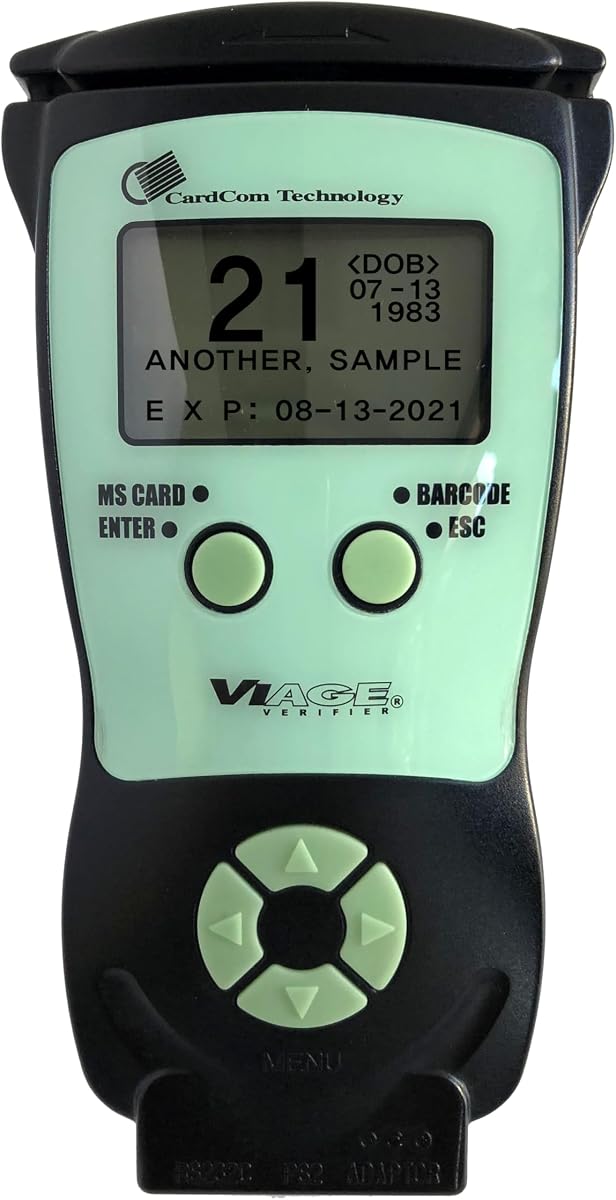
The CAV3200 stands out with dual scanning for barcode and magnetic stripe IDs. This ensures coverage for various ID formats across the nation. It is a standalone device requiring no external connections. The backlight display ensures visibility in dark venues.
We may earn a commission when you buy through this link, at no additional cost to you.
Strengths include due diligence reporting with free software. The ergonomic design improves comfort during long shifts. ID updates are free for the device's life, reducing long-term costs. It provides quick age verification on the screen.
Trade-offs are its reliance on battery power. The screen is compact for detailed data viewing. For mobile bars, the portability is a major plus. It avoids hidden fees effectively with standard included accessories.
Best for venues with mixed ID formats. The magnetic stripe capability handles older IDs better. Use it for mobile verification or entry points. It offers excellent value with lifetime updates and compliance tools.
Reads both 2D barcodes and magnetic stripes. This ensures you can verify older IDs that lack modern barcodes.
Due diligence reporting is included with free ID updates. No hidden fees or subscriptions are required for ongoing use.
We may earn a commission when you buy through this link, at no additional cost to you.
This model features an extra-large 5-inch LCD screen for clear results. It highlights new vs repeating clients effectively. The device includes VIP tagging with expiration dates for security. It exports scan records in Excel format easily.
We may earn a commission when you buy through this link, at no additional cost to you.
Strengths include human voice warnings for better staff awareness. The 12+ hour battery supports long shifts. It supports WiFi sync for multiple devices via IDVisor Sync. The cradle keeps the device charged and accessible.
Trade-offs are the weight and size. It is less portable than smaller models. For fixed locations with multiple users, the large screen is helpful. The price is higher but justified by the CRM features.
Ideal for venues with shared devices. The large display improves visibility for staff. Use it where detailed data review is needed. It balances verification with robust customer data management tools.
The 5-inch screen provides clear visibility for staff. This reduces errors and speeds up the verification process.
Export scan and customer records in Excel format. This simplifies auditing and internal reporting requirements.
We may earn a commission when you buy through this link, at no additional cost to you.
Built for long shifts, this portable scanner is rugged and efficient. It features a swappable battery for continuous use. The IP68 rating protects against drops and dust. It supports Mobile Driver's License as an upgrade option.
We may earn a commission when you buy through this link, at no additional cost to you.
Strengths include compliance with specific state laws like Utah. The industrial barcode scanner handles high volumes well. Charging takes under 90 minutes for minimal downtime. The vinyl decal helps deter underage sales effectively.
Trade-offs include the cost of premium hardware. It requires careful setup for regulatory compliance. For mobile venues, the durability is essential. The fast operation suits high-traffic entry points.
Best for bars needing mobile verification. The rugged build ensures longevity in tough conditions. Use it for security checks away from fixed counters. It supports local regulations effectively with flexible logging.
Swap batteries to keep checking without downtime. Fast charging ensures minimal downtime during busy periods.
Designed to support local compliance needs including PA and UT. Proper configuration ensures you meet state requirements.
We may earn a commission when you buy through this link, at no additional cost to you.
Designed for clubs, this handheld scanner handles wet environments well. The water and dust seal protects against drink splashes. It is ready to use out of the box. The vibration alert notifies users of restricted entries.
We may earn a commission when you buy through this link, at no additional cost to you.
Strengths include Wi-Fi for easy connection with devices. The carry case ensures safe storage during transport. Audible warnings simplify understanding for staff. It validates IDs from multiple countries effectively.
Trade-offs are limited battery details in the description. It relies on stable Wi-Fi connectivity for data transfer. The durability is suited for noisy and messy venues. The design maintains customer relationships well.
Best for nightclubs needing robust security. The wet protection adds value in spill-prone areas. Use it for high-volume entry checks. It balances speed with protection in challenging environments.
Water and dust seals protect against drink splashes. This ensures reliability in bars and clubs with spills.
Includes an outer carry case for safe storage. This protects the device during transport between locations.
We may earn a commission when you buy through this link, at no additional cost to you.
This fixed unit provides clear Go/No-Go results instantly. It works fully without a computer for easy setup. The logging is flexible and exportable for audits. It complies with key state verification laws.
We may earn a commission when you buy through this link, at no additional cost to you.
Strengths include broad ID compatibility with US licenses. Privacy is protected since no photos are stored. The simple operation reduces training needs for new staff. It includes a vinyl decal for fraud deterrence.
Trade-offs are the lack of portability. It requires continuous power connection. For static entry points, this is not an issue. The speed is under a second for efficient service.
Ideal for venues needing reliable fixed verification. The lack of computer dependency reduces technical issues. Use it for main entrances where compliance is key. It supports multiple state requirements effectively.
The scanner works fully without a connected computer. This simplifies setup and reduces technical dependencies.
Meets key state laws for verification. This helps avoid fines and ensures regulatory compliance.
We may earn a commission when you buy through this link, at no additional cost to you.
The Swish S1 offers a simple optical scanning solution for Windows. It captures high-resolution images of IDs and cards. The automatic age verification checks user-specified requirements. It works with many healthcare and practice systems.
We may earn a commission when you buy through this link, at no additional cost to you.
Strengths include no damage to thin or fragile cards. The scanner has no moving parts to prevent jams. It saves scans to user folders in various formats. The included app manages a searchable database easily.
Trade-offs are Mac incompatibility and manual entry for non-barcode IDs. For Windows users, it is cost-effective. The optical capture is great for document storage. Use this where image archives are needed.
Best for budget-conscious Windows offices. The simplicity reduces training requirements significantly. Use it for insurance or medical card scanning. It provides reliable optical capture with minimal maintenance.
No rollers or slots prevent card damage. It is safe for thin or fragile identification documents.
A full version of the Scan-ID app is included. This helps manage and search scanned card images easily.
We may earn a commission when you buy through this link, at no additional cost to you.
Selecting the right scanner requires evaluating your specific business needs, budget, and regulatory requirements.
Determine if you need to move the scanner between locations or keep it at a counter. Portable units offer flexibility for security checks, while countertop models are ideal for stationary entry points.
Choose portable for mobile teams and fixed for main entrances.
Ensure the scanner supports all ID types you encounter, including barcodes, magnetic stripes, and passports. Some models handle damaged or worn IDs with manual entry options.
Check compatibility for local and national ID standards.
Advanced scanners offer detection of tampering or shared IDs through encrypted data analysis. Consider if you need real-time alerts or just standard age checks.
Prioritize models with tamper detection for high-risk venues.
Look for systems that automatically log scans and provide exportable reports. This simplifies audits and helps prove due diligence to authorities.
Ensure logs meet your state's specific requirements.
Verify whether the device captures photos of patrons. Some venues prefer systems that store no images to protect customer privacy.
Select non-camera models if privacy is a priority.
Consider connectivity options like USB, Wi-Fi, or standalone modes. Ensure the software updates regularly and supports your operating system.
Confirm software support for your POS or database.
Some models include free updates, while others charge for fake checks. Look for upfront pricing without hidden ongoing costs.
Review the total cost of ownership before buying.
For portable units, check battery life and charging time. Fixed units require reliable power outlets. Swappable batteries extend operational time significantly.
Match power needs to your shift duration.
Always place the scanner on a stable, dry surface. For handheld models, hold the device firmly and scan the barcode slowly to ensure accurate reading.
Clean the scanning window with a soft cloth regularly. Avoid using harsh chemicals that might damage the optical components.
Keep your firmware updated to support new ID formats. Store portable units in their cases to prevent accidental drops.
Most models allow configurable data storage. Some store scan logs for compliance, while others offer photo capture. Always review privacy settings before deployment.
Many scanners support passports from various countries. Check the specific model specs to confirm support for the regions you serve.
Advanced models often include manual entry options. This allows staff to input data if the barcode is unreadable.
Standalone models work offline. Online features like cloud sync require a connection. Choose based on your network setup.
Portable units typically offer 12+ hours. Swappable batteries can extend this indefinitely during shifts.
Many models include lifetime updates. Some charge fees for advanced fake ID detection services. Always check the pricing model.
Most systems allow exporting to formats like Excel. This helps with internal reviews or external audits.
We reviewed ten top scanners ranging from compact units to robust premium models. The IDetect ID Scanner remains our top recommendation for speed and integration.
Prioritize compliance and durability based on your venue type. Ensure the system meets state laws to avoid penalties.
Always check current prices and availability before purchasing. Technology updates frequently so verify the latest features.