
Portable Printers Wireless for Travel
4.1Editor score
Inkless thermal design
Lightweight travel form
Bluetooth mobile pairing
This guide compares ten top-rated battery powered portable printers for travel and business, evaluating connectivity, print quality, and portability to help
Battery powered portable printers offer incredible freedom for professionals and students who need to print documents away from a desktop setup. These devices combine mobility with functionality, allowing you to produce physical copies of files instantly without relying on wall outlets or network connections.
We evaluated ten real models based on their build quality, connectivity options, battery life, and overall print performance. Our analysis focuses on how well each printer handles everyday tasks like printing contracts, photos, or labels while remaining lightweight enough to carry in a backpack or briefcase.
Each pick in this list highlights specific strengths and ideal use cases to help you find the right tool for your needs. Keep in mind that product availability and pricing can change frequently, so always check the latest details before making your final purchase decision online.
4.1Editor score

4.4Editor score
4.5Editor score
The following table provides a side-by-side overview of the top ten models, highlighting their key specifications to help you quickly compare features like weight, connectivity, and paper sizes across all contenders.



The Canon PIXMA TR160 stands out as a versatile option for users needing color output on the go. With a 4.2 star rating, it balances portability and performance effectively for everyday printing tasks.
We may earn a commission when you buy through this link, at no additional cost to you.
Its 5-Color Hybrid Ink System ensures vibrant photos and sharp text up to 8.5×11 inches. The 1.44 OLED display makes checking ink levels and status effortless without needing to open an app.
While it lacks a built-in battery, its lightweight design fits easily in bags. The Wireless Direct Mode allows connection without a router, making it reliable for spontaneous printing jobs.
Ideal for students and mobile professionals who need color quality. If you can manage external power or a separate pack, this is a top recommendation for portability.
The hybrid ink system delivers rich colors and crisp text ideal for both documents and photos.
The OLED screen provides instant access to printer status, keeping you informed while on the move.
We may earn a commission when you buy through this link, at no additional cost to you.
This HP model earns high marks for its ability to scan, copy, and print wirelessly. Rated 4.3 stars, it is a robust choice for users needing full office capabilities in a portable form.
We may earn a commission when you buy through this link, at no additional cost to you.
The included battery and fast charge feature ensure you are rarely tethered to a wall. It supports a wide range of paper sizes, from cards to legal sheets, adding significant versatility.
Its main drawback is weight compared to simpler printers, but the functionality trade-off is worth it for many. The HP app simplifies mobile printing and scanning tasks efficiently.
Best for business travelers who need to process documents fully. If you value scanning and copying alongside printing, this unit delivers reliable performance anywhere you go.
Gain access to scanning and copying without carrying separate devices or bulky equipment on your trips.
Charge within 90 minutes to get back to work quickly, ensuring minimal downtime during busy travel days.
We may earn a commission when you buy through this link, at no additional cost to you.
The HP OfficeJet 200 achieves a 4.4 star rating by combining portability with essential office features. It is slightly smaller than the 250 but retains core functionality for on-the-go users.
We may earn a commission when you buy through this link, at no additional cost to you.
Included battery and Auto Wireless Connect make setup simple even for non-tech savvy users. It supports common paper sizes and delivers consistent output quality for standard business documents.
While it lacks the scanning function of the 250, the lighter weight is often a better trade-off for travelers. The high yield cartridges help reduce the frequency of replacements on the road.
Recommended for those prioritizing battery-included convenience and ease of use. If you just need to print contracts and forms, this is a strong, reliable choice for daily use.
Auto Wireless Connect allows you to get online instantly without complex pairing steps or router dependencies.
High yield cartridges ensure you print more pages before needing to replace supplies, saving time and money.
We may earn a commission when you buy through this link, at no additional cost to you.
This Epson model is designed for color needs with flexible charging via USB or AC. It scores 4.1 stars for its robust connectivity and optional accessory battery for extended use.
We may earn a commission when you buy through this link, at no additional cost to you.
The built-in lithium-ion battery ensures dependable performance, and Wi-Fi 5 provides faster wireless speeds than older models. You can also add an external accessory battery for high volume printing tasks.
It is one of the pricier options, which might deter budget-conscious buyers. However, for those needing reliable color printing in the field, the performance justifies the investment significantly.
Best suited for creative professionals needing vibrant prints. If you need color and flexibility in charging, this is a top-tier portable printer worth considering for your workflow.
Charge via USB or AC and even add an external battery pack for all-day printing without power worries.
Wi-Fi 5 ensures faster data transfer speeds, allowing you to send large files quickly from your devices.
We may earn a commission when you buy through this link, at no additional cost to you.
The Gloryang printer offers a simple, inkless solution for travelers needing quick document copies. Rated 4.2 stars, it is lightweight and comes with a case and rolls to get started immediately.
We may earn a commission when you buy through this link, at no additional cost to you.
It connects via Bluetooth to iOS and Android, allowing prints from phones easily. The thermal technology means no ink cartridges or toner to replace, reducing ongoing costs significantly for users.
The lack of color and paper limitations are trade-offs for portability. However, for contracts, notes, or drafts, it performs well and keeps your workspace tidy with its built-in bin.
Ideal for students or professionals needing quick, cost-effective prints. If you want to avoid ink mess and save money, this is a smart, convenient travel companion choice.
Eliminate ink cartridge costs and mess entirely by using advanced thermal paper technology for all your prints.
Includes a case and multiple paper rolls, so you can start printing immediately upon receiving your package.
We may earn a commission when you buy through this link, at no additional cost to you.
This A285M model is praised for supporting five thermal paper sizes and its ultra-light 1.5lb weight. With a 4.0 rating, it offers a balance of compactness and flexible output for various needs.
We may earn a commission when you buy through this link, at no additional cost to you.
It connects via Bluetooth for mobile and USB for PCs, making it versatile across devices. The built-in bin keeps your desk or car area tidy, preventing loose paper clutter during use.
PC use requires a driver download which can be a slight hurdle for quick setup. But for most mobile users relying on phones, it is straightforward and highly portable for quick printing tasks.
Best for those needing flexibility in paper width without bulk. If you handle receipts, labels, and letters, this printer adapts well to your daily requirements effectively.
Supports everything from 2 inch labels to full letter sheets, offering flexibility for different types of tasks.
The built-in bin organizes paper neatly, keeping your workspace clean whether you are at home or on the road.
We may earn a commission when you buy through this link, at no additional cost to you.
Rated 4.3 stars, the D90E comes ready for use with a case and paper included. It is a robust thermal option designed to work with the Labelnize app for mobile printing convenience.
We may earn a commission when you buy through this link, at no additional cost to you.
The power button ejects paper automatically during jams, making recovery simple. It supports standard US Letter paper and connects via Bluetooth or USB for flexible device compatibility across your setup.
Charging adapter is sold separately which adds a small step to setup. However, the ease of use and portability make it a strong contender for students and professionals on the go.
Great for students or small business users needing simple printing. If you want a hassle-free setup and reliable performance without ink, this is a solid and easy choice.
Simply press the power button to automatically eject jammed paper, saving time and frustration during use.
Comes with a case and paper to start printing right out of the box for immediate productivity.
We may earn a commission when you buy through this link, at no additional cost to you.
The JADENS printer achieves a high 4.6 rating with excellent battery life of 360 sheets per charge. It is designed for privacy and AI features, making it unique among thermal options.
We may earn a commission when you buy through this link, at no additional cost to you.
Users can print locally without uploading to the cloud, protecting sensitive documents. The app offers AI tools for image generation and editing, adding value beyond simple printing tasks for creative work.
It requires specific thermal paper and does not support color printing. Despite these limits, the battery endurance and security focus make it a standout budget option for students and business users.
Perfect for users who value battery life and privacy. If you want a reliable printer with extra app features at a low cost, this is a top budget pick for mobile printing.
Print up to 360 sheets on a single charge, ensuring you never run out of power during long trips.
Print locally without uploading files to the cloud, keeping your documents and data secure during every session.
We may earn a commission when you buy through this link, at no additional cost to you.
Rated 4.1 stars, the N80 supports tattoo transfer paper which makes it unique for artists. With 203 DPI, it offers clear prints suitable for detailed documents and templates on the go.
We may earn a commission when you buy through this link, at no additional cost to you.
It includes a USB cable but sells the adapter separately. The 1500mAh battery provides 160 sheets per charge, making it reliable for occasional travel printing or short sessions.
PC setup requires a driver but the app on phones is easy. The ability to print transfer designs sets it apart from standard office printers for creative professionals.
Ideal for tattoo artists or those needing specific paper support. If you want a versatile printer for designs and documents, this offers great value and functionality for your needs.
Supports tattoo transfer paper, allowing you to create designs and transfer them directly for artistic projects easily.
203 DPI ensures text and images are sharp, making it suitable for professional looking documents and templates.
We may earn a commission when you buy through this link, at no additional cost to you.
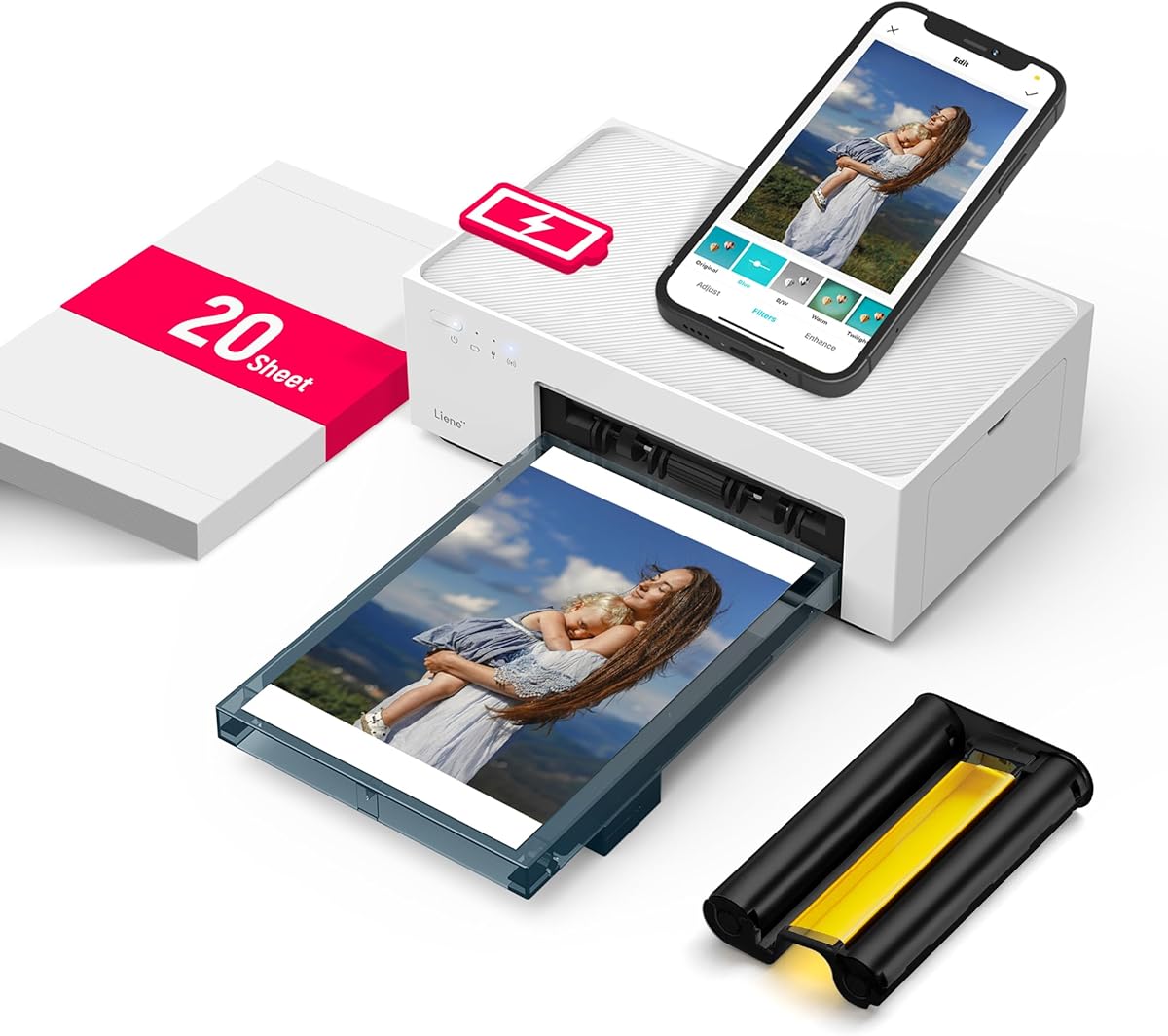
This Liene printer scores 4.5 stars for producing professional-quality 4×6 photos using dye sublimation. It is built for travelers who want to capture and print memories instantly without complex setups.
We may earn a commission when you buy through this link, at no additional cost to you.
Its built-in hotspot allows up to five users to connect simultaneously without home WiFi. Photos come out with a protective coating, making them water and scratch resistant for lasting durability.
It is limited to photo sizes and does not handle documents. However, the image quality is far superior to standard thermal printers for keeping personal and family memories alive.
Best for photo enthusiasts needing portable instant prints. If you want vibrant, lasting memories from your travels, this is the ultimate portable photo printer for any home or trip.
Photos are coated to resist scratches and water, ensuring your memories stay vibrant and protected for years.
Connect to five devices at once via the built-in hotspot for seamless sharing and printing during group events.
We may earn a commission when you buy through this link, at no additional cost to you.
Choosing the right portable printer depends on balancing power, size, and features for your specific needs. This guide explores the key factors to consider before buying.
Modern portable printers offer Wi-Fi, Bluetooth, or USB connections. Bluetooth is most common for phones, while USB ensures laptop compatibility. Ensure the printer supports your device's connection standards for seamless printing.
Look for models with Bluetooth and USB to avoid compatibility issues across different devices.
Battery capacity varies from 1500mAh to larger packs. Some printers support AC charging while others rely solely on USB. Check how many sheets you can print per charge to match your daily usage needs.
Prioritize printers with fast charge features and high sheet counts for uninterrupted use on the go.
Inkjet printers offer color but need cartridges, while thermal printers use inkless paper. Inkjet provides higher quality for photos, but thermal is cheaper and lighter. Choose based on whether color or cost matters more.
Decide between color inkjet and lightweight thermal based on your budget and document requirements.
Most portable printers handle standard 8.5×11 or A4 sheets. Some support narrower labels or receipts. Check the maximum width and thickness support to ensure it meets your typical document sizes.
Confirm the printer supports your required paper width to avoid resizing or wasting materials.
Lightweight models weigh under 2 pounds, fitting easily in bags. Heavier units with batteries or scanners may be bulkier. Consider how much you will carry daily to choose the right balance.
Select a unit that feels comfortable to carry if you use it frequently while traveling.
Mobile apps often add editing, AI, or layout tools. Some printers require specific apps to function. Look for intuitive interfaces and features like filters or templates to enhance your printing experience.
Choose printers with robust apps that offer value like AI tools or editing capabilities.
Thermal paper is cheaper than ink cartridges but may fade over time. Inkjet has higher upfront costs. Factor in long-term supply costs to avoid surprise expenses after the initial purchase.
Consider the ongoing cost of paper and ink to manage your total budget effectively.
Sturdy builds withstand travel bumps better. Check for warranty terms and support availability. A solid warranty protects your investment against defects or battery failures during use.
Invest in brands with reliable support and warranties to ensure long-term satisfaction.
Start by downloading the manufacturer's app and pairing your device via Bluetooth or Wi-Fi. Follow the on-screen instructions to connect and update firmware if needed for the best experience.
Load paper carefully according to the guide, avoiding curled or damp sheets that can cause jams. Keep the printer in a cool, dry place to prevent paper sticking or internal damage.
Charge the battery fully before first use and store it at moderate temperatures. Clean the print head periodically using a soft cloth or recommended tool to maintain quality over time.
Most models connect directly to smartphones via Bluetooth or Wi-Fi. Some require drivers for laptops, but mobile apps often handle most printing tasks. Always check compatibility before buying for phone-only use.
Thermal printers are lighter and inkless, making them ideal for text and drafts. Inkjet offers color but is heavier. Choose thermal for cost and portability or inkjet for quality and photos.
Lower print density and turn off the printer when not in use. Store the battery partially charged when not used for long periods to maintain overall health and capacity.
Thermal printers need specific heat-sensitive paper, which is available online. Inkjet models use standard paper. Always buy the correct type to avoid jams and poor print quality.
Yes, models like the Liene M200 are built for photos. Others print black and white documents. Check DPI and supported paper types before using them for color images.
Turn off the printer and open the cover gently. Remove any stuck paper without pulling forcefully to avoid damage. Some models eject paper automatically when powered back on.
Most operate quietly compared to desktop models, though thermal ones can hiss slightly. Use silent mode if available to minimize noise in shared or quiet spaces.
With proper care, they last 3 to 5 years. Avoid extreme temperatures and handle with care to protect internal components. Regular cleaning helps maintain longevity and print quality.
Our top picks cover a range of needs, from the HP OfficeJet 200 for office tasks to the JADENS for budget efficiency and the Liene for photo prints. Each model excels in its own way depending on your priorities.
Prioritize battery life and connectivity if you travel often, and consider paper size needs for your daily work. A printer that fits your specific workflow will save time and frustration in the long run.
Prices and availability can fluctuate, so check the latest offers before purchasing. With the right choice, you will gain the freedom to print wherever inspiration or deadlines strike.