
Epson LQ-590II
4.3Editor score
584 mono speed
Parallel and USB ports
Durable monochrome print
Dot matrix computer printers remain essential for businesses requiring durable carbon copies and multi-part forms. These impact devices deliver unmatched reliability in high-volume environments where other technologies often fail or require expensive consumables.
We analyzed ten top models based on build quality, print speed, connectivity options, and user ratings. Our comparison highlights critical differences in pin configurations, duty cycles, and interface support to guide your purchasing decision accurately.
Each pick showcases specific strengths like energy efficiency or paper handling capabilities. Remember that pricing fluctuates daily so verify current costs before buying to ensure you secure the best deal for your operational needs.
4.3Editor score

4.7Editor score

4.8Editor score
As an Amazon Associate we earn from qualifying purchases.
This table offers a side-by-side look at all ten selected models. Review the key specifications including pin count, speed, and connection types to quickly identify which printer aligns with your specific workflow requirements.


The Oki Microline 320 Turbo/N stands out as a top choice for businesses needing robust impact printing. With a high user rating, this model offers exceptional reliability for continuous duty cycles where other printers might struggle or fail.
We may earn a commission when you buy through this link, at no additional cost to you.
Its 24-pin architecture ensures crisp output even on carbon copies. The inclusion of both USB and parallel ports means legacy systems integrate seamlessly. This flexibility makes it ideal for warehouses or factories with older infrastructure.
While the cost is higher than basic models, the durability justifies the investment. Users appreciate the consistent feed and low jam rate. The noise level is typical for impact printers but does not detract from performance in industrial settings.
Choose this printer if you need high-volume reliability and multi-part form capability. It is an excellent investment for businesses prioritizing longevity and consistent output quality over initial cost savings.
The 24-pin design delivers superior text clarity compared to 9-pin alternatives ensuring professional documents remain legible even after multiple copies.
Support for both USB and parallel ports allows easy integration into mixed environments without needing expensive adapters or hardware replacements.
We may earn a commission when you buy through this link, at no additional cost to you.
The Epson LQ-590II delivers exceptional value for small businesses seeking reliable impact printing without a large upfront cost. Its solid rating reflects consistent performance in everyday tasks like invoicing and shipping label generation.
We may earn a commission when you buy through this link, at no additional cost to you.
With 24-pin technology it provides clear output suitable for standard business documents. The mix of USB and parallel connectivity ensures compatibility with modern and legacy computers. This adaptability is crucial for growing businesses with varied IT setups.
While limited to monochrome output this printer excels at text-heavy jobs. The speed is impressive for the price point allowing quick turnaround for high-volume orders. Users report minimal maintenance needs which further reduces long-term expenses.
Opt for the LQ-590II if budget constraints are a priority but quality cannot be compromised. It is a smart choice for startups or small offices needing a workhorse printer for daily administrative tasks.
This model balances initial purchase price with low maintenance requirements ensuring a favorable return on investment for budget-conscious businesses.
The 584 cps speed ensures rapid document generation which is vital for high-volume shipping or billing departments needing quick turnaround times.
We may earn a commission when you buy through this link, at no additional cost to you.
The Oki Microline 620 represents the pinnacle of impact printing reliability and precision. With a near perfect user rating it stands out for businesses demanding flawless performance in critical operations where downtime is not an option.
We may earn a commission when you buy through this link, at no additional cost to you.
Its design focuses on high-volume versatility allowing it to handle extensive daily printing schedules without overheating or slowing down. The simplified media loading feature reduces operational friction making it easier for staff to manage print queues efficiently.
Users praise the sharp precise printing which ensures barcodes and text remain legible on every copy. While the cost and size are significant the investment pays off through reduced errors and consistent output quality over many years.
Select this model for enterprise environments where reliability and speed are paramount. It is the ideal solution for large distribution centers or government offices requiring heavy-duty performance and minimal intervention.
Simplified media loading reduces downtime and operator effort allowing staff to focus on core tasks rather than printer maintenance.
Built for heavy continuous duty this printer ensures consistent availability for critical business functions that cannot afford frequent interruptions.
We may earn a commission when you buy through this link, at no additional cost to you.
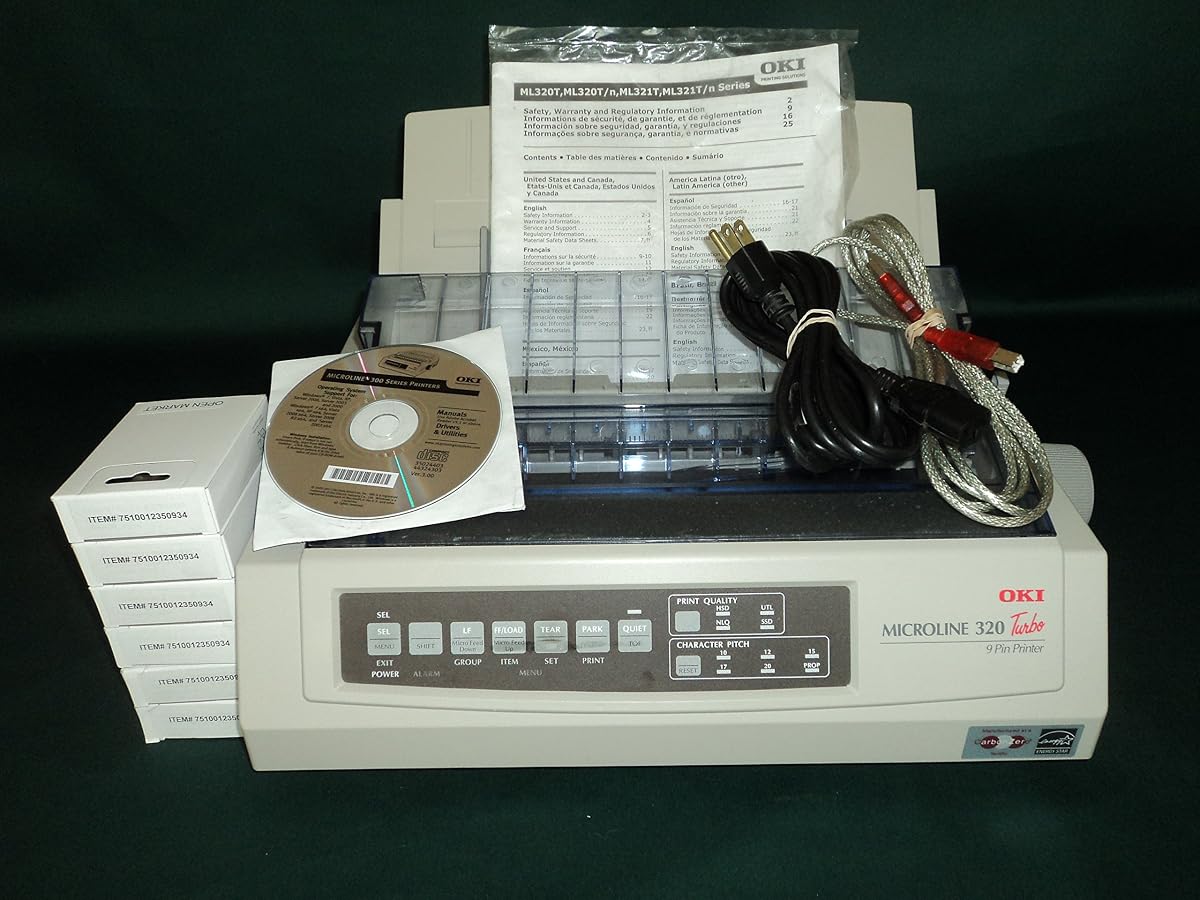
The OKI MICROLINE 320 Turbo offers a dependable solution for offices needing standard impact printing capabilities. Its solid rating indicates consistent performance over time making it a trusted choice for routine document generation tasks.
We may earn a commission when you buy through this link, at no additional cost to you.
Featuring 9-pin technology it balances cost and output quality effectively. The 64 KB memory and dual connectivity options ensure compatibility with various systems. This model excels in environments where speed is less critical than consistency.
Users find it easy to maintain with standard ribbon replacements. The duty cycle supports daily use without excessive strain. While not the fastest it provides steady output that meets most business invoice and reporting needs reliably.
Consider this printer for small to medium businesses needing a straightforward impact solution. It is a practical choice for organizations that prioritize reliability and standard features over advanced high-speed capabilities.
Steady output ensures that invoices and reports are generated correctly every time reducing the need for reprints and administrative waste.
USB and parallel ports allow integration into diverse IT environments without requiring specialized drivers or complex configuration steps.
We may earn a commission when you buy through this link, at no additional cost to you.
The OKI 62418701 MICROLINE 420 is built for environments requiring sustained high-volume output. Its 570 cps speed and 128 KB memory allow for efficient processing of complex documents without buffer overflows or delays.
We may earn a commission when you buy through this link, at no additional cost to you.
Rated as Energy Star this model helps businesses reduce power consumption while maintaining performance. The inclusion of both parallel and USB ports ensures it fits into both new and existing office setups seamlessly.
Users appreciate the higher duty cycle which supports continuous operation during peak periods. While it uses 9-pin technology it still delivers readable text for all standard business applications. Maintenance is straightforward with standard parts available.
Choose the MICROLINE 420 for warehouses or logistics centers needing reliable high-volume printing. It is a robust choice for businesses looking to balance speed energy efficiency with proven durability.
The 128 KB memory allows for faster processing of large print jobs ensuring that queues clear quickly during busy operational hours.
Energy Star certification contributes to lower utility bills and aligns with corporate sustainability goals without compromising on print speed.
We may earn a commission when you buy through this link, at no additional cost to you.
The Oki MICROLINE 320 Turbo boasts a perfect user rating reflecting exceptional satisfaction among users. Its versatility with serial USB and parallel ports makes it uniquely adaptable for businesses needing specific connectivity options.
We may earn a commission when you buy through this link, at no additional cost to you.
Despite being 9-pin it delivers sharp text and barcodes suitable for most business documents. The duty cycle supports regular heavy use without overheating or performance degradation. This model is ideal for offices with diverse hardware setups.
Users highlight the ease of connectivity and low failure rate over time. The 240×216 dpi ensures clarity even on multi-part forms. While it shares features with other models the perfect score highlights consistent quality across production batches.
Select this printer if connectivity flexibility and high user satisfaction are priorities. It serves as a reliable backup or primary unit for offices needing robust connectivity options without sacrificing print quality.
Support for serial USB and parallel interfaces allows seamless connection to virtually any system ensuring no compatibility issues in mixed environments.
High dpi resolution ensures that critical data like barcodes and serial numbers remain readable across all copies in a multi-part form.
We may earn a commission when you buy through this link, at no additional cost to you.
The Epson LQ-2090II combines 24-pin precision with energy efficiency for businesses concerned about power consumption. Its lower rating may reflect specific use cases but it remains a capable printer for standard impact printing needs.
We may earn a commission when you buy through this link, at no additional cost to you.
With 550 mono cps it offers decent speed for text-heavy workflows. The parallel port ensures compatibility with legacy systems that require direct wired connections. Energy Star certification helps reduce operational costs over the printer's lifespan.
Users report that print quality is sharp though setup might require care for alignment. It is a solid option for environments where power savings and text clarity are valued over the latest connectivity standards. Maintenance is standard for Epson devices.
Consider this printer for small businesses needing energy-efficient impact printing. It is best suited for settings where parallel connectivity is required and power costs are a significant operational factor.
Energy Star certification ensures lower power usage during idle periods reducing electricity costs while maintaining consistent print output performance.
24-pin technology delivers readable text suitable for invoices and forms ensuring professionalism even on multi-part carbon copies.
We may earn a commission when you buy through this link, at no additional cost to you.
The OKI62411601 Oki MICROLINE 320 Turbo features unique zero-tear and auto-park technology that minimizes paper waste. This makes it an excellent choice for businesses aiming to reduce material costs and operational friction.
We may earn a commission when you buy through this link, at no additional cost to you.
Its ability to produce up to six copies ensures thorough documentation for shipping or contracts. The 5 inch per second feed rate maintains steady throughput without constant manual intervention. Multiple emulations allow broad software compatibility across different platforms.
Users appreciate the ease of setup and consistent feed rates. While it is 9-pin the output remains legible for all standard business needs. Maintenance is straightforward with standard parts available for quick replacement.
Choose this model if reducing paper waste is a priority. It is a practical solution for logistics or accounting departments needing reliable multi-copy output and minimal downtime during high-volume periods.
Zero-tear auto-park technology ensures paper is fed correctly reducing waste and improving operator satisfaction during daily printing tasks.
The ability to produce up to six copies ensures all parties receive accurate documentation reducing disputes and administrative rework.
We may earn a commission when you buy through this link, at no additional cost to you.
The Oki Microline 620 delivers top-tier reliability for businesses needing high-volume versatile printing. Its high rating reflects consistent performance and user satisfaction making it a trusted choice for critical operational tasks.
We may earn a commission when you buy through this link, at no additional cost to you.
Simplified media loading ensures that operators can quickly manage paper and carbon sheets without technical difficulties. The precise sharp printing guarantees that barcodes and text remain legible across multi-part forms reducing errors in critical transactions.
Users note that the build quality withstands heavy daily use without degradation. While the footprint is larger the performance benefits outweigh spatial concerns for most business environments. Maintenance is minimal ensuring maximum uptime during busy periods.
Select this printer for high-stakes operations requiring dependable output. It is an ideal choice for large enterprises where downtime can result in significant operational losses or customer dissatisfaction.
Simplified media loading reduces the time staff spend on printer management allowing them to focus on core business tasks.
Built for continuous duty this printer ensures consistent output over years of service reducing the need for frequent replacements.
We may earn a commission when you buy through this link, at no additional cost to you.
The Epson LQ-590 provides a standard impact solution with reliable 24-Pin clarity for text documents. Its lower rating may reflect basic feature sets but it remains a viable option for offices needing straightforward document generation.
We may earn a commission when you buy through this link, at no additional cost to you.
With USB interface it connects easily to modern systems while supporting ESC/P and IBM PPDS for broad software compatibility. This makes it suitable for businesses using legacy software alongside newer operating systems.
Users find it adequate for low to medium volume tasks. The 24-pin design ensures text clarity for invoices and reports. While not feature-rich it offers solid performance for those prioritizing simplicity and cost over advanced capabilities.
Consider this printer for small setups needing basic impact functionality. It is a practical choice for businesses where standard text output is sufficient and advanced features are not required.
Support for multiple emulation standards ensures compatibility with both legacy and modern software reducing the need for custom drivers.
24-Pin technology delivers readable text suitable for invoices and reports ensuring professionalism even in basic document workflows.
We may earn a commission when you buy through this link, at no additional cost to you.
Selecting the right dot matrix computer printer depends on your specific volume needs and environmental constraints. We break down six critical factors to ensure you choose a model that aligns perfectly with your operational requirements.
Print speed determines how quickly your business can generate invoices and shipping labels. Models range from 435 cps to 584 cps which significantly impacts daily throughput. Faster speeds are critical for warehouses handling high volume orders daily.
Prioritize models with at least 550 cps for high-volume environments to maintain workflow efficiency.
Pin count directly influences text clarity and the quality of multi-part forms. 24-pin models produce sharper output than 9-pin alternatives making them better for professional documents. If you frequently print carbon copies prioritize 24-pin units.
Choose 24-pin printers for crisp text and reliable carbon copies in professional settings.
Legacy systems often require parallel or serial ports while modern setups rely on USB. A versatile printer offering multiple connectivity types ensures seamless integration across different computers. Check your existing infrastructure before purchasing.
Ensure the printer supports both USB and legacy ports to avoid compatibility issues.
Monthly duty cycle indicates how many pages a printer can handle without overheating. For daily heavy use choose models rated for 20000 pages or more. This metric ensures longevity and prevents performance degradation under stress.
Select printers with a duty cycle of 20000 pages to support continuous daily operation.
Features like zero-tear and auto-park reduce paper waste and simplify operator tasks. Simplified media loading allows staff to switch between single sheets and tractor feed quickly. Efficient paper handling reduces downtime during critical printing periods.
Look for zero-tear and simplified loading features to improve workflow efficiency.
Energy Star certified models reduce power consumption without sacrificing speed. Over time this saves on electricity costs and aligns with corporate sustainability goals. Always check the power ratings for long-term operational savings.
Choose Energy Star certified models to minimize energy costs and environmental impact.
Always load paper carefully using the tractor feed guides to prevent jams. Ensure ribbons are seated correctly to avoid smudging on final documents.
Clean the print head regularly using a soft cloth and approved cleaning solution. Dust accumulation can degrade print quality over time.
Keep firmware updated to maintain compatibility with new software. Check manufacturer sites for driver patches monthly to ensure stable operation.
Dot matrix printers excel at printing multi-part carbon forms which laser and inkjet models cannot do. They are also more durable in harsh environments where dust or heat might damage delicate printers.
Yes they are widely used in logistics warehouses and government offices. Their ability to print continuous forms and survive tough conditions keeps them relevant in specific industries.
Ribbons typically last for 2 million to 3 million characters depending on usage volume. High traffic environments may require more frequent replacements than low volume offices.
Most models provide drivers for both Windows and macOS. Always check the manufacturer website to ensure compatibility with your specific OS version before purchasing.
24-pin models produce sharper text and better quality carbon copies than 9-pin units. The higher pin count allows for more precise dots per inch resulting in clearer output.
Most models rely on USB or parallel ports rather than WiFi. You may need a separate print server to connect them to a wireless network effectively.
We identified the Oki Microline 320 Turbo/N as the top overall pick due to its balanced performance and reliability. The Epson LQ-590II remains the best budget option for small businesses needing solid functionality.
Prioritize connectivity options and pin configuration based on your specific workflow needs. A mismatch in these areas can lead to compatibility issues or poor output quality that affects your operations.
Verify current availability and pricing on Amazon as inventory fluctuates daily. This guide provides the framework but real-time data ensures you secure the best value for your investment.