
Integral 4GB Crypto-197
4.1Editor score
FIPS 197 Certified
Waterproof Double Layer Design
Auto-Lock Feature Enabled
This guide compares the top ten encrypted USB flash drives based on security standards, encryption types, durability, and compatibility to help you secure
Protecting sensitive data is more critical than ever in our digital age. An encrypted USB flash drive offers a secure way to store and transfer confidential files without relying on cloud services or complex software setups.
We evaluated ten leading models based on encryption standards, hardware features, durability, and ease of use. Our analysis focuses on FIPS validation, attack resistance, and real-world performance across different operating systems.
Each pick highlights specific strengths for various user needs from government compliance to personal privacy. Please note that product availability and pricing fluctuate frequently so verify details before purchasing.
4.1Editor score
4.6Editor score

4.5Editor score
This side-by-side comparison highlights key specifications and security features across all ten selected encrypted USB flash drives to help you identify the model that best fits your specific protection needs.


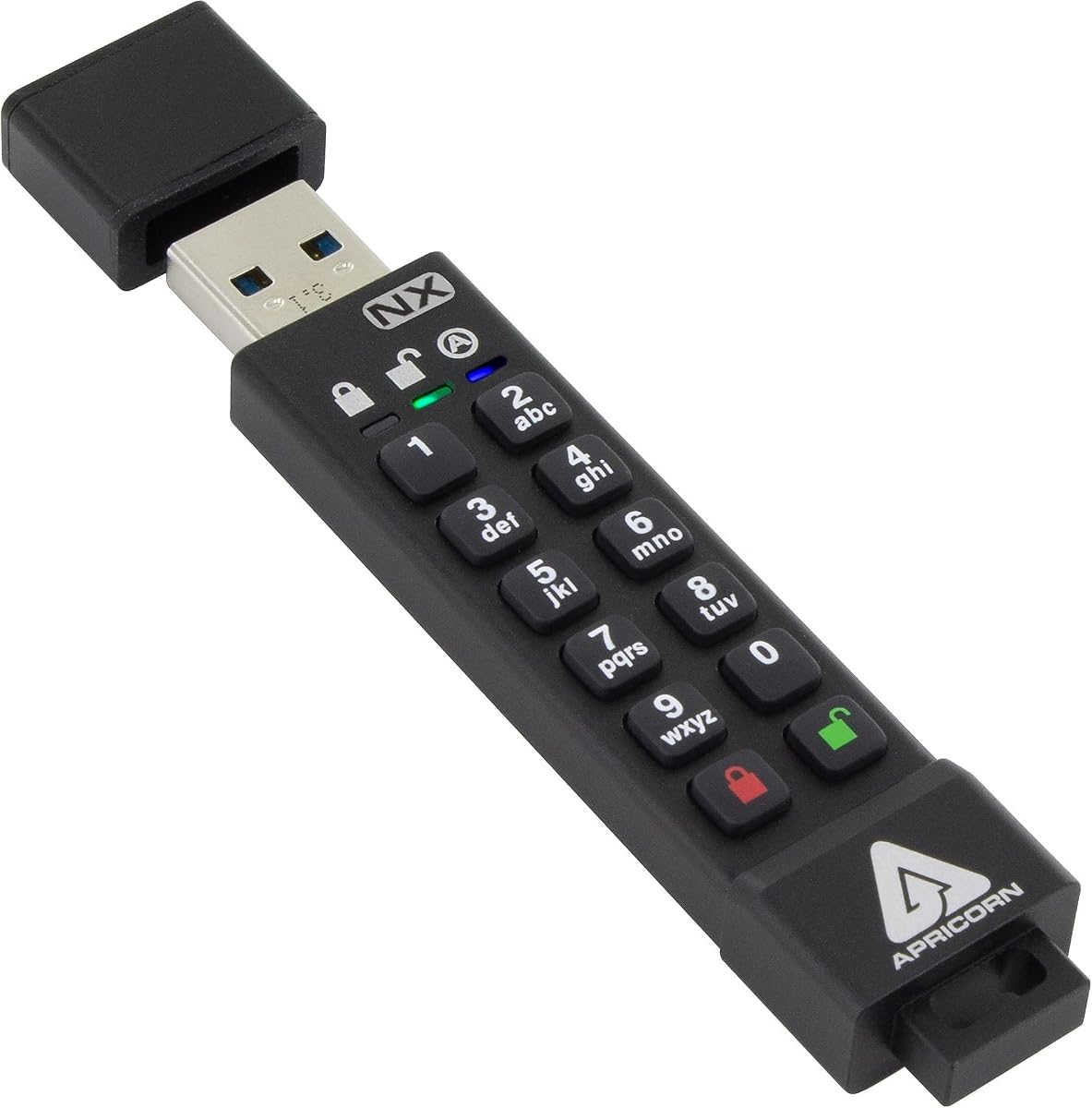
The Apricorn 8GB Aegis Secure Key 3 NX stands out as a top choice for users requiring verified security standards. It holds FIPS 140-2 Level 3 validation which is critical for government and enterprise use cases.
We may earn a commission when you buy through this link, at no additional cost to you.
This drive features separate admin and user modes allowing administrators to enforce security policies while users access data securely. The hardware encryption ensures data remains protected even if the drive is lost or stolen.
While the 8GB capacity may seem small by modern standards the focus here is on maximum security rather than bulk storage. The lack of software requirements makes it compatible with virtually any system.
It is ideal for IT professionals and compliance officers who need a reliable portable storage solution. The robust security features justify the cost for organizations prioritizing data protection over capacity.
The FIPS 140-2 Level 3 validation ensures this drive meets strict cryptographic module security requirements for sensitive data.
Separate admin and user modes allow organizations to manage access rights and enforce password policies effectively.
We may earn a commission when you buy through this link, at no additional cost to you.
The Kingston IronKey Vault Privacy 50 offers a compelling mix of high capacity and top-tier security for professionals who need more than standard storage. Its 256GB space accommodates large datasets while maintaining robust protection.
We may earn a commission when you buy through this link, at no additional cost to you.
Hardware-based XTS-AES 256-bit encryption provides business-grade security that is faster and safer than software alternatives. Additional protections against brute force and BadUSB attacks make it resilient against modern threats.
The multi-password option with complex and passphrase modes allows users to balance security and usability according to their specific needs. This flexibility is rare in high security drives.
Businesses and government contractors will appreciate the TAA compliance which simplifies procurement processes. This drive is a comprehensive solution for those needing secure high volume portable storage.
Digitally-signed firmware and attack protections safeguard against unauthorized access attempts and malicious USB injection.
TAA compliance ensures the drive meets trade agreement requirements for government and large enterprise procurement.
We may earn a commission when you buy through this link, at no additional cost to you.
The Apricorn 128GB Aegis Secure Key 3 NXC bridges the gap between legacy security and modern device connectivity. Its Type-C interface makes it compatible with current laptops and mobile devices without adapters.
We may earn a commission when you buy through this link, at no additional cost to you.
Like other models in the series it maintains FIPS 140-2 Level 3 validation ensuring government grade security. The hardware encryption operates independently of the host system for consistent protection.
The Type-C design is convenient for users who have moved away from legacy USB-A ports entirely. This future-proofs the investment as newer devices continue to drop older connectors.
It is an excellent choice for tech professionals and mobile users who need secure storage on the go. The combination of modern interface and proven security makes it a versatile tool.
USB 3.2 Type-C ensures compatibility with the latest laptops and mobile devices for seamless secure data transfer.
Software free authentication means the drive secures data without relying on external drivers or host OS permissions.
We may earn a commission when you buy through this link, at no additional cost to you.
The Integral 4GB Crypto-197 provides an affordable entry point into secure hardware encryption without compromising on essential security standards. It carries FIPS 197 certification making it a compliant choice for many basic needs.
We may earn a commission when you buy through this link, at no additional cost to you.
Its dual-layer waterproof design adds physical durability to protect the crypto reader from environmental hazards. This is particularly useful for field work or environments where devices may be exposed to elements.
Auto-lock functionality ensures data remains encrypted whenever the drive is removed or the screen locks reducing the risk of accidental exposure. Zero footprint means no software installation is required.
For individuals needing secure storage for small critical files this drive offers excellent value. It balances cost effective pricing with necessary security protocols for everyday personal protection.
Hardened internal case and rubberized outer case protect against bumps drops and water immersion during use.
Auto-lock feature encrypts data immediately upon removal ensuring files are never left accessible on a public PC.
We may earn a commission when you buy through this link, at no additional cost to you.
The iStorage datAshur PRO 4 GB uses a physical PIN entry system which eliminates reliance on host keyboard input. This provides strong security against keyloggers and software vulnerabilities during authentication.
We may earn a commission when you buy through this link, at no additional cost to you.
Its IP57 rating protects against dust and water making it highly reliable for rugged environments. The device is also certified for NATO Restricted data which adds to its trustworthiness.
The drive works on any device with a USB port requiring no software installation for setup. This broad compatibility ensures it can be used across Windows Mac and Linux systems easily.
It is well suited for users who prioritize physical authentication over software methods. The combination of PIN security and environmental resistance makes it a robust tool for sensitive data storage.
Enter a PIN directly on the device to authenticate ensuring keystrokes are never captured by malware or keyloggers.
IP57 certification guarantees the drive remains functional after exposure to dust and temporary water immersion.
We may earn a commission when you buy through this link, at no additional cost to you.
This encrypted USB drive offers hardware based encryption through a built-in independent chip protecting data at the source level. The AES256-bit algorithm ensures that files are secure from unauthorized access attempts.
We may earn a commission when you buy through this link, at no additional cost to you.
The aluminum alloy shell provides a sturdy and lightweight housing for the device. Automatic locking after 30 seconds of inactivity adds a layer of security against forgetfulness.
A reset and wipe function activates after ten incorrect password inputs which helps prevent brute force attacks. This adds a defensive mechanism that protects data integrity during repeated access attempts.
For users seeking a balance of capacity and security features this model presents a practical option. The hardware approach ensures consistent performance without relying on external software drivers.
Drive locks automatically if unused for 30 seconds or unplugged ensuring data is never left exposed.
Ten wrong inputs trigger an automatic reset and data wipe to prevent unauthorized access attempts.
We may earn a commission when you buy through this link, at no additional cost to you.
The Lexar 128GB JumpDrive F35 PRO distinguishes itself with fingerprint authentication providing a convenient biometric layer of security. This allows quick access without typing complex passwords repeatedly.
We may earn a commission when you buy through this link, at no additional cost to you.
Speed is another highlight with read rates up to 400MB/s making file transfers significantly faster than standard drives. This performance is paired with 256-bit AES encryption to protect stored files.
Saving up to 10 different fingerprints makes it adaptable for shared environments or multiple user accounts. The recognition time is under one second ensuring smooth interaction during daily use.
It is ideal for professionals who value speed and convenience alongside standard encryption. While it may lack strict government certifications the biometric feature offers a modern user experience.
Fingerprint authentication allows secure access with a simple touch eliminating the need to remember complex passwords.
Ultra-fast recognition and read speeds ensure large files are transferred quickly and securely.
We may earn a commission when you buy through this link, at no additional cost to you.
The iStorage datAshur PRO2 32 GB builds on the strengths of the PRO model with an even higher IP68 dust and water resistance rating. This makes it suitable for extreme environments and outdoor field use.
We may earn a commission when you buy through this link, at no additional cost to you.
It maintains FIPS 140-2 Level 3 certification ensuring it meets strict security standards for government and enterprise use. Real-time AES-XTS 256-bit encryption protects data during transfer.
The drive works on any device with a USB port without requiring software installation. This cross-platform compatibility ensures it can be used across diverse systems and operating environments.
It is a robust choice for users who need both maximum physical durability and high security standards. The combination of certifications and rugged design makes it reliable for demanding work.
IP68 certification ensures full protection against dust ingress and continuous submersion in water.
Hardware encryption helps ensure compliance with major data protection regulations like GDPR and HIPAA.
We may earn a commission when you buy through this link, at no additional cost to you.
The Kingston Ironkey D500S 16GB introduces an industry-first dual hidden partition feature for enhanced operational security. This allows separation of data into distinct zones for different security levels.
We may earn a commission when you buy through this link, at no additional cost to you.
It features pending FIPS 140-3 Level 3 certification which aligns with the latest federal standards for cryptographic modules. The zinc casing provides physical resistance against penetration attacks.
Brute force and BadUSB protection mechanisms safeguard against unauthorized access and malicious hardware attacks. Multi-Pin options allow administrators to customize access rules for different users.
It is ideal for security officers and government personnel who need compartmentalized storage. The advanced partition features and rigorous protection make it a powerful tool for high security environments.
Dual hidden partitions allow you to separate sensitive data into distinct secure zones on the same drive.
Rugged zinc casing protects the internal components from physical damage and tampering attempts.
We may earn a commission when you buy through this link, at no additional cost to you.
The Kingston 8GB D300S provides a secure and compact solution for portable data storage. Its AES 256 XTS encryption ensures files are protected using strong industry standard cryptographic algorithms.
We may earn a commission when you buy through this link, at no additional cost to you.
The small form factor makes it easy to carry on a keychain or in a pocket without bulk. This convenience is balanced by reliable hardware encryption that keeps data safe.
It serves well for users who need to transfer small critical documents securely. The focus on core security features rather than complex options ensures straightforward usage.
It is a reliable option for professionals and individuals seeking a trusted brand with essential security features. The simplicity and brand reliability make it a solid basic choice for encryption.
Kingston is a well-established storage brand known for reliability and consistent performance in security products.
Compact size allows for easy transport ensuring your secure storage travels with you wherever needed.
We may earn a commission when you buy through this link, at no additional cost to you.
Selecting the right encrypted USB flash drive involves balancing security standards, storage capacity, durability, and compatibility with your devices.
Encryption standards define how securely your data is protected on the drive. Look for hardware encryption with AES 256-bit which is the industry standard for strong protection against unauthorized access.
Prioritize hardware based encryption over software solutions as they are less vulnerable to operating system vulnerabilities and malware attacks.
FIPS validation indicates compliance with federal cryptographic security standards often required by government and enterprise sectors. FIPS 140-2 Level 3 or 140-3 Level 3 offers higher security assurance than basic certified drives.
If you work in regulated industries or government contracting always verify the specific FIPS level mentioned in the product specifications.
Storage capacity varies widely from small 4GB models to larger 256GB or higher options. Choose a size that matches your typical file volume needs without overpaying for unused space.
Consider that security focused drives often prioritize performance and protection over massive capacity so plan accordingly for your storage requirements.
Authentication can be handled via passwords PINs or biometrics like fingerprint sensors. PIN or physical auth prevents keylogging while biometrics offer convenience without typing codes.
Evaluate your usability needs and security priorities when selecting between keyboard based PIN entry or onboard keypads.
Physical durability is crucial for portable drives that may be dropped or exposed to harsh conditions. Look for water resistance ratings like IP67 or IP68 and ruggedized casing.
A durable shell protects the internal components from physical damage ensuring the drive remains functional during travel or field work.
Ensure the drive is compatible with your operating systems and devices. Most modern drives work on Windows macOS and Linux but verify specific driver requirements if needed.
USB-C compatibility is increasingly important for newer laptops and mobile devices so consider a dual interface or type-C drive for future proofing.
Some models include data recovery PINs or mechanisms to regain access if you forget your primary credentials. This feature prevents permanent data loss due to user error.
Check the manufacturer policies on recovery and whether additional steps or fees apply to retrieve your secure data in an emergency.
A robust warranty ensures the manufacturer stands behind the product quality and security claims. Reputable brands typically offer multi-year warranties and accessible customer support.
Verify the warranty terms and support channels before purchasing to ensure you have help if the device fails or you need assistance.
First set up your drive by following the manufacturer instructions for creating a password or PIN. Ensure you store this credential securely and consider setting up a recovery PIN if available.
Always use the safe eject option before unplugging the drive to prevent data corruption. Lock the drive or disconnect it immediately after use to ensure data remains encrypted at all times.
Keep the drive dry and avoid extreme temperatures or physical shocks. Periodically check firmware updates from the manufacturer to ensure the device remains secure against new threats.
Hardware encryption uses a dedicated chip on the drive to encrypt data independently of your computer making it more secure than software encryption. Software encryption relies on your operating system which can be compromised by malware whereas hardware encryption remains safe even if the host is infected.
FIPS certification is primarily designed for government and enterprise compliance so it may not be strictly necessary for personal use. However FIPS drives often offer stronger and more tested security features making them a safer choice for highly sensitive personal data.
Most secure drives wipe data after repeated failed attempts to protect against brute force attacks. Some models include a separate admin or recovery PIN feature so always set up recovery options during initial configuration to avoid permanent data loss.
Hardware encryption is designed to operate efficiently and typically does not significantly impact transfer speeds. High quality encrypted drives use fast interfaces like USB 3.2 to ensure that encryption overhead remains minimal during file transfers.
To transfer files safely simply authenticate with your PIN or password and mount the drive like a normal storage device. Drag and drop files as you would with any USB drive ensuring you eject safely when done to maintain data integrity.
Most hardware encrypted drives are compatible with Windows Mac and Linux without requiring additional software. The encryption happens on the drive itself allowing it to function across different operating systems seamlessly.
The top choices reviewed offer a range of security features from government FIPS validated drives to affordable personal options. Each model balances protection capacity and usability to meet different user needs effectively.
Prioritize encryption standards and authentication methods that match your specific security requirements and workflow. A secure drive protects your most valuable data and should be chosen based on verified security certifications.
Always check current product details and pricing before purchasing to ensure you select the right model. Security technology evolves quickly so staying informed helps you make the best choice for your data protection.