
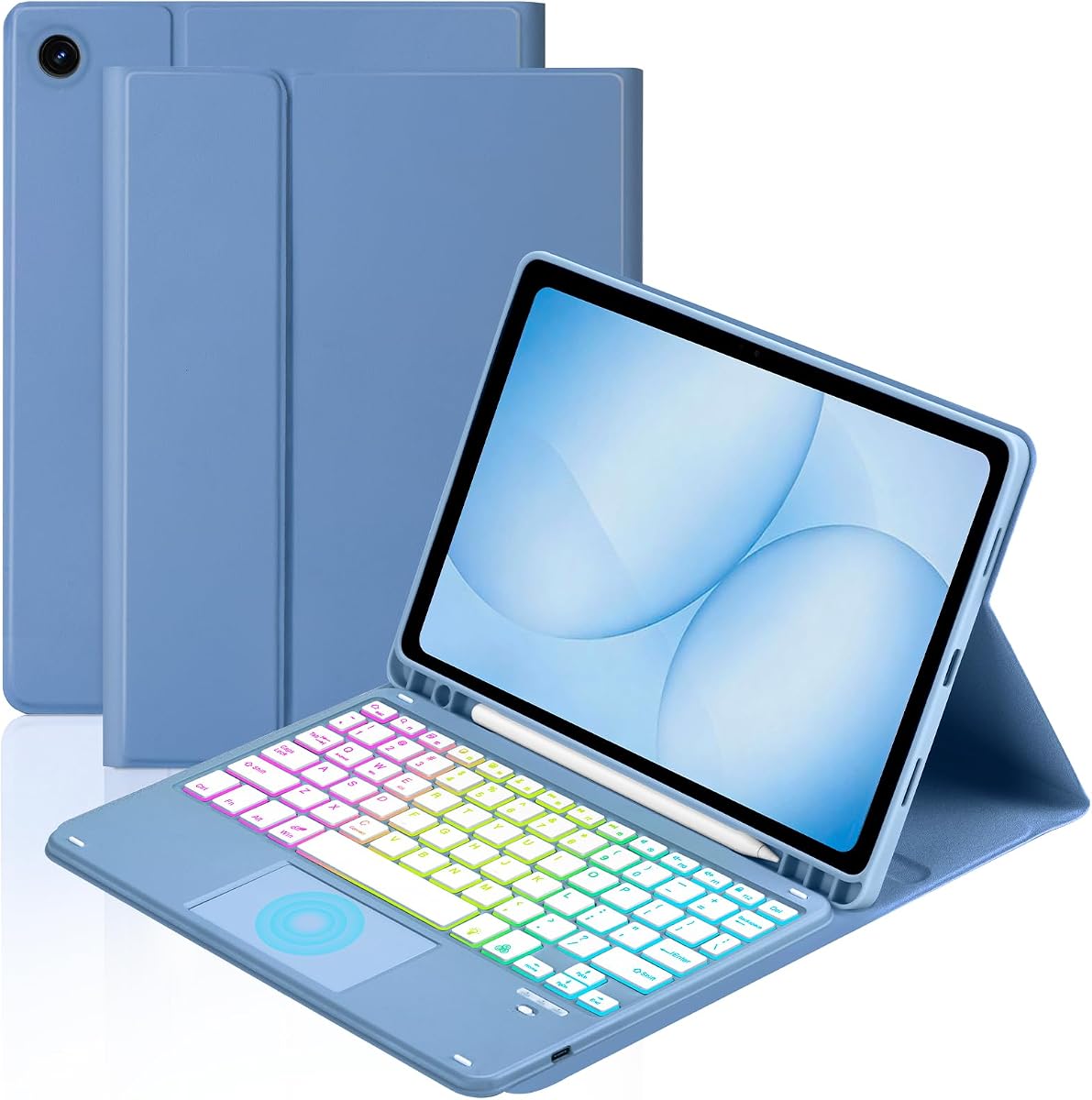
YBING Keyboard Case for Samsung Galaxy Tab A11 Plus & Galaxy Tab A9 Plus
4.5Editor score
7-color rainbow backlight
360 degree rotation
Detachable magnetic keyboard
Discover the best keyboard for Samsung A11 Tablet with our expert guide comparing top models featuring trackpads, backlighting, and detachable designs for
Finding the perfect keyboard for your Samsung A11 tablet transforms your device into a productive workstation. A quality keyboard case offers tactile typing, built-in protection, and essential shortcuts that make editing documents and browsing the web significantly more efficient than using touch screens alone.
We have carefully evaluated ten top-rated keyboard solutions specifically designed for the Galaxy Tab A11 and A9 Plus models. Our analysis focuses on build quality, battery longevity, typing comfort, and additional features like trackpads or mouse support to ensure you find the ideal match for your workflow.
Each selection below highlights key strengths and potential trade-offs to help you make an informed decision quickly. Please note that while we provide detailed specifications based on manufacturer data, product availability and pricing can fluctuate frequently across different online retailers.
4.5Editor score

4.3Editor score

4.6Editor score
This side-by-side comparison highlights the core specifications and unique selling points of each keyboard case to help you quickly identify which model aligns with your specific usage needs and budget constraints.




The Dexnor keyboard case stands out as a reliable choice for users seeking a balance of portability and functionality. It transforms your Samsung A11 tablet into a workstation-ready device with its integrated trackpad and responsive keys.
We may earn a commission when you buy through this link, at no additional cost to you.
This model features a robust magnetic support system that keeps the tablet secure at a 120-degree viewing angle. The built-in trackpad supports multi-finger gestures, allowing for seamless navigation without needing to touch the screen constantly.
While the design is lightweight at just 1.36lbs, it lacks the floating cantilever mechanism found in higher-end models. This means the screen sits directly on the keyboard base rather than being elevated above it.
It is an excellent fit for students and professionals who need durable protection and long battery life. The smart power-saving features ensure your device stays ready whenever you need to get work done efficiently.
The multi-touch trackpad supports gestures for scrolling and zooming, making web browsing and document editing smoother than using touch controls alone.
With up to 200 hours of use without backlight and a rapid three-hour charge time, this keyboard ensures you stay productive throughout long workdays.
We may earn a commission when you buy through this link, at no additional cost to you.
The TUNKARMOR case offers a versatile solution for those who prefer a detachable keyboard layout. It allows you to move and adjust the keyboard position easily to suit different tasks or viewing preferences.
We may earn a commission when you buy through this link, at no additional cost to you.
Its design includes anti-slip slots that let you adjust the tablet to one of three viewing angles. This flexibility is particularly useful when switching between typing, reading, or watching video content throughout the day.
Although it lacks a built-in trackpad, the protective case provides solid defense against bumps with its honeycomb grid inner layer. This structure adds durability and helps prevent overheating during extended usage sessions.
This option is best for users who prioritize versatility and protection over advanced pointing features. It keeps your device safe and organized while offering a straightforward typing experience on the go.
Moving the tablet forward or backward along the case lets you choose a comfortable angle for writing or reading without needing additional props.
Full edge coverage combined with cushioning helps protect the device from drops and scratches, extending its lifespan significantly in daily use.
We may earn a commission when you buy through this link, at no additional cost to you.
This keyboard case distinguishes itself by including a rechargeable Bluetooth mouse alongside the standard trackpad. It offers dual control options for users who prefer mouse precision for detailed tasks like graphic editing.
We may earn a commission when you buy through this link, at no additional cost to you.
The keyboard features a vibrant 7-color rainbow backlight with three modes including constant on and breathing light. This adds a stylish touch to the setup while ensuring visibility in darker environments like evening study sessions.
While the inclusion of a mouse is a strong plus, it means managing an extra battery and charging cable. The trackpad remains a convenient alternative when quick navigation is needed without the mouse.
It is an ideal choice for users who want desktop-like control on their tablet. The combination of trackpad, mouse, and colorful lighting makes it a versatile tool for various work and leisure activities.
Switch between the smart trackpad and the wireless mouse depending on your task to maximize efficiency and comfort during different types of work.
The backlight offers three modes and three brightness levels, allowing you to tailor the visual experience to your preference and ambient light.
We may earn a commission when you buy through this link, at no additional cost to you.
The Soke keyboard case is designed for users who value a strong connection and system flexibility. It supports iOS, Windows, and Android with easy system switching via keyboard shortcuts for cross-platform workflows.
We may earn a commission when you buy through this link, at no additional cost to you.
Its wireless connectivity boasts a range of up to 10 meters, allowing you to move freely around the room without dropping the connection. This range is superior to many standard bluetooth keyboards on the market today.
While it lacks a trackpad, the magnetic detachable design ensures a secure fit for typing. The backlight options provide a comfortable typing experience even in low-light conditions without distracting glare.
This model is recommended for power users who need reliability and compatibility across different devices. Its robust construction and convenient features make it a top contender for professional environments.
Switch between systems quickly using the dedicated function row, making it easy to use this keyboard with different operating systems seamlessly.
The extended operating distance gives you the flexibility to type from a comfortable distance, ideal for presentations or relaxed content creation.
We may earn a commission when you buy through this link, at no additional cost to you.
The YBING case stands out for its 360-degree rotation capability and budget-friendly pricing. It allows you to use the tablet in both horizontal and vertical orientations without extra adjustments.
We may earn a commission when you buy through this link, at no additional cost to you.
Its keyboard features a vibrant 7-color rainbow backlight and a breathing light mode. The shortcut function keys on the first row help you manage common tasks quickly and efficiently while working.
The 16 built-in magnets ensure the keyboard stays firmly attached during typing sessions. This strong adsorption prevents accidental slips, providing stability even when moving the device around.
This is an excellent value choice for students or casual users who need basic functionality without extra cost. The rotation and lighting features add a layer of convenience that exceeds its price point.
The flexible design lets you adjust the tablet for videos or reading, enhancing versatility for different content types and angles.
The first row of keys is programmed for common actions like copy and paste, speeding up your workflow during document editing sessions.
We may earn a commission when you buy through this link, at no additional cost to you.
The Harvopu keyboard case includes a wireless mouse with 3-level DPI adjustment for precise control. This feature is particularly beneficial for graphic editing or tasks requiring detailed cursor movement.
We may earn a commission when you buy through this link, at no additional cost to you.
Its battery life is exceptional, offering up to 180 hours of continuous use on a single charge. The auto sleep mode ensures power is saved when the keyboard is not in use, maximizing efficiency.
The case itself is designed to be stain-resistant and easy to clean, which is useful for keeping your device looking fresh. It repels marks and spills effectively, maintaining a clean appearance over time.
This option is tailored for professionals who need accuracy and longevity from their accessories. The combination of a high-endurance keyboard and precision mouse makes it a powerful tool for demanding workflows.
Switch DPI levels instantly to match your workflow needs, ensuring smooth navigation during browsing and precision during editing tasks.
The tough protective surface resists stains and wipes clean easily, keeping your workspace tidy and your device free from visible wear.
We may earn a commission when you buy through this link, at no additional cost to you.
The TiMOVO case features a sleep mode that engages after 10 minutes of inactivity to conserve power. This helps extend battery life significantly while ensuring the device remains responsive when you return to work.
We may earn a commission when you buy through this link, at no additional cost to you.
It includes three adjustable angles to help you find a comfortable viewing position for different tasks. The backlight offers 7 vibrant colors and 3 brightness levels to suit your preferences in any lighting condition.
Although it does not have a trackpad, the detachable design allows you to store the keyboard away when it is not needed. This makes the tablet easier to carry for media consumption or light browsing.
This is a great choice for users who prioritize battery efficiency and customizable visual settings. The sturdy protection and convenient charging make it a reliable partner for daily use.
The intelligent sleep mode disconnects the keyboard after inactivity but reconnects instantly when you press a key, saving energy without sacrificing convenience.
Choose from 7 colors and 3 brightness settings to personalize your typing environment, adding a touch of style to your setup.
We may earn a commission when you buy through this link, at no additional cost to you.
The MePadKey case features a smart touchpad that supports multi-finger gestures for advanced navigation. It allows for 1 to 4 finger gestures like zooming and switching apps, mimicking a laptop experience.
We may earn a commission when you buy through this link, at no additional cost to you.
It includes a 7-color rainbow backlight and shortcut keys for quick access to common functions. This combination makes it easy to manage your tasks efficiently without navigating through touch menus.
The magnetic adsorption keeps the keyboard firmly in place, preventing movement during typing. However, the material is lighter and less substantial than premium leather options available on the market.
This model is best for users who want precise trackpad control without needing a separate mouse. The rich gesture support and colorful backlight make it a versatile tool for multitasking and browsing.
Use four-finger gestures to switch applications or take screenshots, streamlining your workflow and reducing the need to touch the screen directly.
The function row includes shortcuts for copying and pasting, saving time during document editing or web browsing sessions.
We may earn a commission when you buy through this link, at no additional cost to you.
This version of the MePadKey case emphasizes system switching with a dedicated function key sequence. It works seamlessly with iOS, Android, and Windows, making it versatile for users with multiple devices.
We may earn a commission when you buy through this link, at no additional cost to you.
The case allows for 360-degree rotation and includes non-slip grooves for stable angles. This flexibility helps you position the tablet comfortably for viewing or typing depending on your immediate needs.
The touchpad supports multi-finger gestures for intuitive navigation. However, the layout requires some familiarity to use the shortcut keys and system switches efficiently during active use.
It is a strong option for tech-savvy users who need cross-platform compatibility. The robust protection and rotating stand ensure your device stays secure while offering a flexible input solution.
Press FN combined with Q, W, or E to switch systems instantly, providing convenience when working across different operating environments.
The rotatable design allows the case to be positioned horizontally or vertically, adapting to different content types like videos or documents.
We may earn a commission when you buy through this link, at no additional cost to you.
The Supveco case prioritizes protection with a honeycomb grid pattern designed to shield your tablet from overheating and shocks. Its durable construction ensures long-lasting care for your device during daily use.
We may earn a commission when you buy through this link, at no additional cost to you.
It features a magnetic detachable keyboard with shortcut keys that work across different operating systems. This cross-platform compatibility makes it a flexible tool for users who switch between devices regularly.
The auto sleep/wake function helps conserve battery life effectively. When you close the case, the tablet and keyboard enter a low-power state automatically, ready to wake up instantly when needed.
This is an ideal choice for users who prioritize physical protection and functional reliability. The solid build quality and system versatility make it a dependable accessory for long-term use.
The honeycomb grid inner layer protects the device from overheating and physical impact, ensuring your tablet remains in top condition over time.
Compatible with Windows, Android, and iOS, the keyboard includes switching keys to adapt quickly to the operating system you are using.
We may earn a commission when you buy through this link, at no additional cost to you.
Choosing the right keyboard for your Samsung A11 involves considering several factors that align with your specific usage habits and environment.
Always verify the model number of your device before purchasing. The Samsung Galaxy Tab A11 and A9 Plus share similar dimensions, but slight variations in the SM-X series can affect fit and functionality.
Check the product description carefully to ensure it explicitly lists your tablet's model number to guarantee a proper fit and full functionality.
Decide between a fixed cover or a detachable magnetic keyboard. Detachable options offer more flexibility to remove the keys when you just want to watch videos or draw with a stylus.
If you travel frequently, a detachable design may be more convenient as it reduces weight when the keyboard is not in use.
Some models include a built-in trackpad, while others may come with a separate Bluetooth mouse. A trackpad is useful for precise navigation, but a separate mouse offers ergonomic benefits for long sessions.
If you plan on doing detailed editing or browsing, look for a model that supports multi-finger gestures or includes a mouse accessory for better control.
Look for a keyboard with a rechargeable battery that lasts through your typical workday. Models with low-power modes and fast charging via USB-C are ideal for staying productive without frequent recharging.
Ensure the battery capacity is sufficient for your usage needs, especially if you work in environments where access to a power outlet is limited.
Backlit keyboards are essential if you often work in low-light conditions. Check if the model offers adjustable brightness or color options to suit your personal preference and environment.
Multiple backlight modes, such as constant or breathing light, can help you balance visibility with battery conservation based on your needs.
The case should provide sturdy protection for your tablet against drops and scratches. Look for features like raised edges and shock-absorbing materials to ensure your device stays safe.
A well-designed case not only protects the screen but also adds structural integrity to the overall device, reducing the risk of damage during transport.
Ergonomic design is key for long typing sessions. Look for cases that offer multiple viewing angles to find the most comfortable position for your neck and wrists.
Adjustable stands that keep the screen at eye level can reduce strain and improve posture during extended periods of work or entertainment.
Keyboard shortcuts can greatly enhance productivity by giving quick access to volume, brightness, and media controls. Ensure the keyboard supports your operating system's specific key requirements.
Cross-platform support is valuable if you switch between different devices or operating systems regularly, allowing for a seamless workflow across platforms.
To get started with your new keyboard, ensure your tablet is powered on and the keyboard is fully charged. Follow the pairing instructions in the manual to connect via Bluetooth or place the keyboard on the magnetic base for instant connection.
Keep the keyboard clean by wiping it gently with a dry, soft cloth. Avoid using harsh chemicals or excessive moisture that could damage the keys or the electronic components inside the case.
When not in use for extended periods, store the tablet and keyboard in a cool, dry place. Closing the case when you are finished using it helps preserve the battery and protects the screen from accidental scratches.
Most keyboards listed are compatible with specific models like SM-X230, SM-X236B, and SM-X210. Always check your tablet's model number in settings before purchasing to ensure a perfect fit and full functionality.
Battery life varies by model but typically ranges from 80 to 180 hours of continuous use with backlight off. Most models can be fully charged in two to four hours via a USB-C cable.
Yes, many of these cases include a built-in pencil holder to secure your stylus. However, the stylus itself is usually not included with the keyboard case purchase.
Models with a trackpad often support multi-touch gestures like scrolling and zooming. However, standard keyboards without a trackpad rely on touch screen interaction or an external mouse for navigation.
Many options feature detachable magnetic keyboards that can be removed when not needed. This allows you to use the tablet in a lighter form factor for reading or watching videos.
Most keyboards offer 7-color rainbow backlights with options for constant on, breathing light, or off. Some models also allow you to adjust brightness levels to suit different lighting conditions.
Whether you prioritize portability or advanced features like trackpads and mouse support, there is a keyboard case for every need. The Dexnor model offers a balanced experience while the YBING option provides excellent value for budget-conscious buyers.
Consider your specific workflow when making a choice. If you need to switch between systems or want precise control, models with system switching keys or high-DPI mice may be worth the investment.
Prices and availability can change, so check the current listings on Amazon before finalizing your purchase. Selecting the right keyboard will significantly enhance your productivity and enjoyment of your Samsung A11 tablet.