
Amzboy 15.6 Laptop
4.6Editor score
Affordable price
Fanless design
Fast charging
In today's digital landscape, finding a laptop that balances performance with energy efficiency is crucial for students and professionals alike. Low power consumption laptops offer extended battery life and reduced heat output, making them ideal for all-day use without constant charging. These devices often feature optimized processors and efficient display technologies to maximize uptime while minimizing energy drain.
We have carefully selected and evaluated ten models that excel in energy efficiency without compromising essential usability. Each product was chosen based on its processor architecture, battery capacity, build quality, and overall value proposition. Our comparison focuses on real-world scenarios like web browsing, document editing, and media streaming to ensure practical relevance for diverse user needs.
Each review highlights specific strengths such as portability, connectivity options, and thermal management capabilities unique to every model. We provide detailed specifications and honest assessments to help you make an informed decision based on your specific requirements. Please note that pricing and availability may fluctuate, so verify current details before making a purchase.
4.6Editor score

4.3Editor score

4.5Editor score
As an Amazon Associate we earn from qualifying purchases.
The following table provides a side-by-side comparison of all ten selected models to help you quickly identify the best fit for your needs.




This HP Chromebook stands out as a top choice for those prioritizing energy efficiency and portability. With a strong rating and solid performance metrics, it delivers reliable everyday computing without draining power quickly.
We may earn a commission when you buy through this link, at no additional cost to you.
The Intel Celeron N4120 processor is designed for low power consumption while maintaining smooth performance for web browsing and media. The battery life extends up to 14 hours, ensuring you can work through a full day without plugging in.
While storage is limited to 64 GB eMMC, this is offset by cloud integration and Android app support. The HD display is bright enough for indoor use, and the thin chassis makes it easy to slip into a backpack.
Ideal for students and casual users who need a trustworthy device for online classes or entertainment. If you value battery life and simplicity over heavy local storage, this model is a highly recommended pick.
The extended battery life ensures uninterrupted productivity whether you are in a lecture hall or a coffee shop.
The quad-core design balances speed and energy usage, keeping the device cool during extended sessions.
We may earn a commission when you buy through this link, at no additional cost to you.
Designed for business and education, this Lenovo V15 combines durability with energy-efficient components. Its performance rating reflects reliability for essential tasks like document editing and video conferencing.
We may earn a commission when you buy through this link, at no additional cost to you.
The Intel N100 quad-core processor delivers efficient performance for multitasking while consuming minimal power. The UFS storage ensures fast boot times and application loading, which is a significant improvement over traditional eMMC storage.
Durability is a key highlight, with military-grade testing ensuring the device can withstand daily wear and tear. The anti-glare display reduces eye strain, making it suitable for long work sessions in various lighting conditions.
This laptop is perfect for professionals needing a secure and sturdy device for everyday tasks. The integration of Copilot AI features adds value for users looking to optimize their workflow efficiently.
Windows 11 S mode and TPM 2.0 provide hardware-based security for sensitive business data.
Weighing just 3.42 lbs, it offers the perfect balance of mobility and rugged construction.
We may earn a commission when you buy through this link, at no additional cost to you.
This HP model is a strong contender for everyday use, offering high ratings and efficient performance. The inclusion of modern components like DDR5 RAM ensures smoother multitasking compared to older standards.
We may earn a commission when you buy through this link, at no additional cost to you.
Powered by the Intel N150 processor, it handles basic computing tasks with ease while maintaining low power consumption. The 1TB cloud storage bundle adds significant value, allowing users to store files remotely without cluttering local drives.
The thin and portable design makes it easy to carry, while the battery life supports long periods of work or study. Connectivity options like Wi-Fi 6 ensure fast and stable internet connections for all your needs.
Ideal for students or home users seeking a reliable Windows machine without heavy resource usage. The high customer satisfaction score suggests a seamless user experience and minimal hardware issues.
DDR5 RAM provides faster data access, enhancing overall system responsiveness during multitasking.
Pre-installed Microsoft 365 and OneDrive streamline productivity and document management.
We may earn a commission when you buy through this link, at no additional cost to you.
As a 2026 edition, this laptop brings updated features to the budget-friendly segment. It focuses on providing a modern interface and AI assistance while keeping power consumption low for all-day use.
We may earn a commission when you buy through this link, at no additional cost to you.
The Intel N150 processor ensures smooth performance for browsing and office work. The anti-glare display with 250 nits brightness makes it comfortable for indoor and outdoor use without harsh reflections.
Design-wise, the Natural Silver finish offers a clean look that appeals to students and professionals. The dedicated Copilot key simplifies access to AI tools, potentially streamlining tasks like summarization or data entry.
This model is suitable for those who want the latest technology without a premium price tag. It balances essential features with efficiency, making it a solid choice for general computing needs.
Copilot AI features provide helpful suggestions and tools directly from the keyboard.
Anti-glare technology reduces eye strain during extended reading or typing sessions.
We may earn a commission when you buy through this link, at no additional cost to you.
This Lenovo Essential model stands out with 8GB of DDR5 RAM, offering better multitasking capability than standard 4GB models. It maintains a focus on low power usage while providing enhanced performance for demanding browser tabs.
We may earn a commission when you buy through this link, at no additional cost to you.
The 15.6-inch Full HD display offers more screen real estate for productivity tasks like spreadsheet work. Privacy features such as the physical camera shutter ensure security during video conferences without needing software solutions.
Connectivity is robust with Wi-Fi 6 and multiple ports including USB-C with power delivery. This flexibility allows you to connect external monitors and charge efficiently while on the go.
Suitable for users who need more memory for running multiple applications simultaneously. While slightly more expensive, the performance benefits justify the cost for power users who still value efficiency.
8GB DDR5 RAM allows seamless switching between applications without system slowdowns.
Physical camera shutter provides peace of mind during sensitive online meetings.
We may earn a commission when you buy through this link, at no additional cost to you.
This laptop offers excellent value for money, delivering essential features at a low cost. Its high rating indicates satisfaction with its performance and reliability despite the budget-friendly price point.
We may earn a commission when you buy through this link, at no additional cost to you.
The fanless design ensures silent operation, which is perfect for quiet environments like libraries or bedrooms. The 45W Type-C fast charging eliminates the need for bulky adapters and allows you to charge via USB-C.
With a 15.6-inch FHD display, it provides clear visuals for entertainment and work. Storage can be expanded via a TF card slot, offering flexibility if you need more space for media files.
Best for students or casual users needing a simple device for web browsing and light tasks. The combination of low cost and energy efficiency makes it a top choice for budget-conscious buyers.
Without a fan, the laptop runs completely silently, ensuring no noise disturbances.
Type-C Power Delivery allows for quick charging and versatile port usage.
We may earn a commission when you buy through this link, at no additional cost to you.
The ASUS Vivobook Go is designed with students in mind, offering a slim profile and useful features like a backlit keyboard. It focuses on providing an immersive experience with better audio quality than competitors.
We may earn a commission when you buy through this link, at no additional cost to you.
The Intel Celeron N4500 offers improved graphics and wireless connectivity over previous generations. This helps in streaming content and maintaining stable connections during online classes without consuming excessive power.
Fast-charge technology ensures you can quickly boost battery levels when time is tight. The ergonomic design includes a dedicated privacy shutter, adding a layer of security for video calls.
While the rating is lower, it remains a viable option for those prioritizing aesthetics and portability. It is a solid choice for entry-level computing where style and basic functionality are key.
SonicMaster speakers deliver clearer sound for calls and media consumption.
Backlit keys allow for easy typing in dimly lit rooms or dark study areas.
We may earn a commission when you buy through this link, at no additional cost to you.
This HP model is engineered for mobility, weighing just 3.24 lbs while delivering powerful performance. The high rating reflects user satisfaction with its speed and efficiency for daily tasks.
We may earn a commission when you buy through this link, at no additional cost to you.
The Intel N150 CPU reaches up to 4.4 GHz, providing fast response times for applications. DDR5 RAM ensures efficient data handling, making the system feel snappy even with multiple browser tabs open.
The slim 0.71-inch profile makes it incredibly easy to slip into any bag. Connectivity includes USB-C and HDMI, allowing for versatile setup options at home or in the office.
Ideal for frequent travelers or commuters who need a lightweight machine that doesn't sacrifice speed. The efficiency of the processor ensures it runs cool and extends battery life significantly.
4.4 GHz turbo speeds ensure applications launch quickly and run smoothly.
The ultra-light weight reduces strain during daily commutes or travel.
We may earn a commission when you buy through this link, at no additional cost to you.
The jumper laptop offers an impressive combination of high RAM and storage at a competitive price. Its high rating suggests that users appreciate the performance boost provided by the 12GB memory configuration.
We may earn a commission when you buy through this link, at no additional cost to you.
The Intel Celeron 5205U is designed for ultra-low power consumption, extending battery life for longer sessions. The IPS display reduces eye strain with blue light filtering, making it suitable for long study hours.
Connectivity includes Type-C, HDMI, and USB 3.0 ports to meet daily external device needs. The inclusion of Windows 11 ensures compatibility with modern software and security updates.
This model is great for users who need more memory for multitasking without spending a lot. While the battery is smaller, the energy-efficient processor compensates by keeping power draw low.
IPS panel and blue light filtering reduce strain during extended viewing.
12GB RAM allows running multiple applications without slowing down the system.
We may earn a commission when you buy through this link, at no additional cost to you.
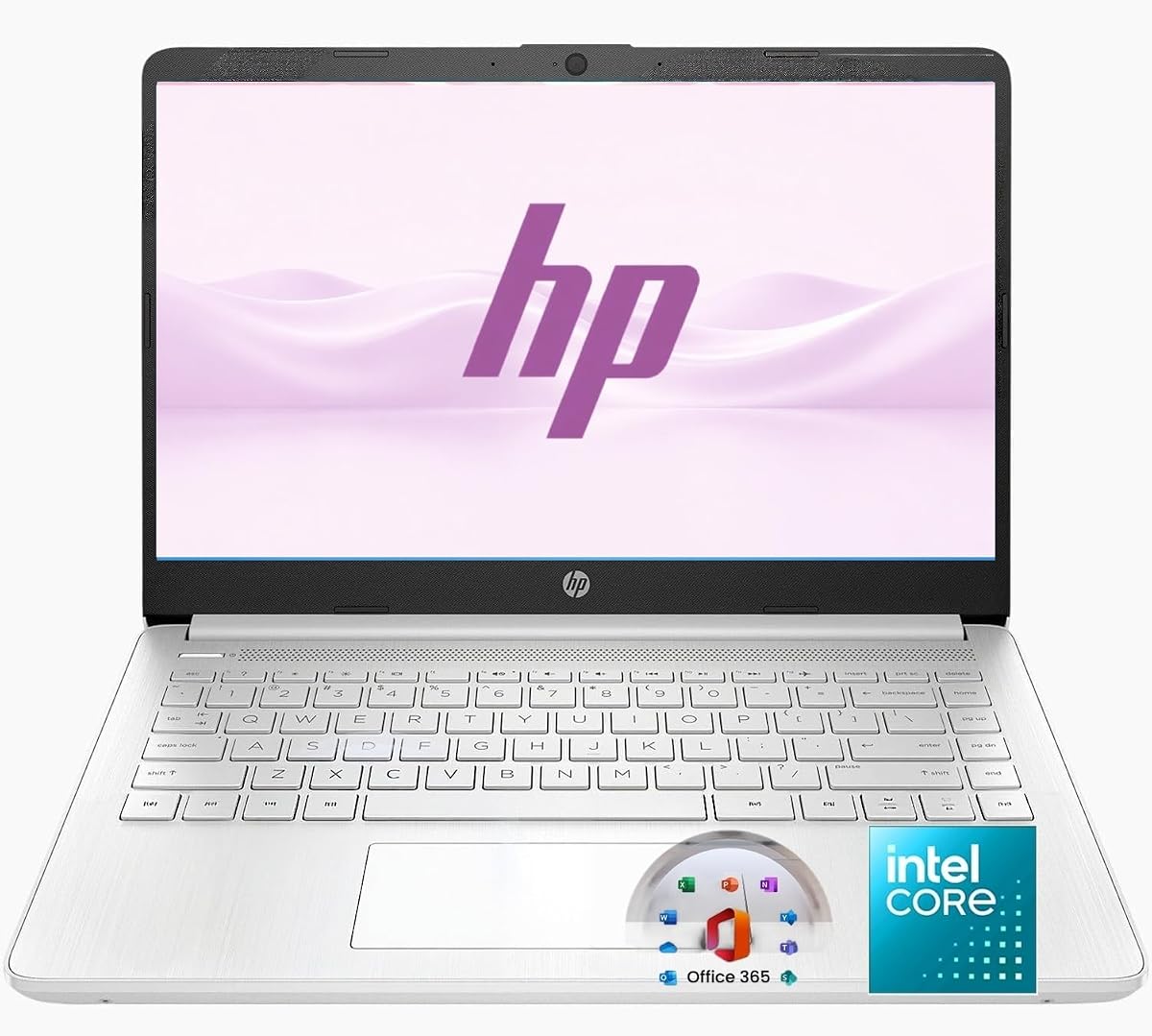
This HP laptop is designed for students and business users needing a ready-to-use productivity tool. It comes bundled with Office 365, making it a complete solution for document creation and editing.
We may earn a commission when you buy through this link, at no additional cost to you.
The Intel N150 processor is optimized for everyday computing tasks like web browsing and email. With 8GB RAM, it handles multitasking efficiently, allowing smooth transitions between apps and browser tabs.
The inclusion of Wi-Fi 6 ensures fast wireless performance, crucial for streaming and video calls. Storage can be expanded with an SD card or external drive, providing flexibility for large file collections.
A practical choice for those who want a seamless setup right out of the box. The focus on efficiency and essential tools makes it a strong contender for daily work and study.
Pre-installed Office 365 allows immediate access to Word and Excel.
Wi-Fi 6 provides faster speeds and better reliability for home networks.
We may earn a commission when you buy through this link, at no additional cost to you.
Selecting a low power consumption laptop involves evaluating processor efficiency, battery life, and build quality to ensure optimal performance without frequent charging.
The processor is the heart of power efficiency. Look for chips like Intel N-series or Celeron which are designed specifically for low power draw while maintaining adequate performance for basic tasks.
A lower TDP (Thermal Design Power) rating indicates less energy consumption and heat generation. This results in longer battery life and a quieter device.
Battery capacity is usually measured in watt-hours (Wh). A higher Wh rating generally translates to longer usage time between charges. Aim for at least 40Wh for a full day of moderate use.
Consider the manufacturer's estimated hours of playback or active use. Real-world usage will vary based on brightness and connected peripherals, so choose a model with a margin of safety.
The screen consumes a significant portion of energy. LCD panels with efficient backlighting and lower brightness settings consume less power than high-brightness OLED displays.
Opt for an anti-glare coating to reduce eye strain and allow lower brightness settings. This indirectly saves power by not needing to crank up the brightness in well-lit rooms.
RAM and storage types impact power usage. LPDDR5 RAM is more energy-efficient than DDR4. Similarly, SSDs and UFS storage consume less power than traditional mechanical hard drives.
Ensure you have enough RAM to avoid swapping memory to disk, which increases power use. 8GB is a comfortable minimum for smooth operation in modern applications.
Wi-Fi 6 and Bluetooth 5.0 are more power-efficient than older standards. They allow the device to maintain stable connections without constantly drawing power to search for signals.
Check for USB-C charging support which allows for versatile and efficient power delivery. This can reduce the need for multiple adapters and ensure stable charging speeds.
A durable build ensures the device can withstand daily handling. Materials like aluminum dissipate heat efficiently without needing active cooling fans that consume power.
Lightweight designs contribute to portability, making it easier to carry without extra strain. This is essential for students or commuters moving frequently between locations.
Operating systems like Chrome OS or Windows 11 Home in S mode are optimized for efficiency. They limit background processes that can drain battery unnecessarily.
Look for features like Fast Charge technology which quickly restores power when needed. This ensures you spend less time tethered to an outlet and more time using the device.
ENERGY STAR and EPEAT certifications indicate environmental responsibility and energy efficiency. These standards ensure the device meets specific criteria for low power consumption.
Choosing a certified device often comes with a warranty and support guarantee. This provides peace of mind regarding the longevity and reliability of the hardware.
To maximize battery life, adjust your display brightness to the lowest comfortable level and avoid running heavy background applications. Enable power-saving modes in your operating system settings to throttle performance when on battery power.
Keep your software updated to ensure you benefit from the latest security patches and efficiency improvements. Regularly restart your device to clear temporary files and memory caches that might slow down performance.
Store your laptop in a cool, dry place and avoid extreme temperatures that can degrade battery health. Use a protective sleeve or case to prevent physical damage during transit.
Low power laptops are designed to prioritize efficiency, so they may not handle heavy tasks like gaming or video editing. However, they excel at web browsing, document editing, and media streaming without sacrificing speed for everyday tasks.
Battery life varies by model and usage intensity. Most models listed offer between 10 to 14 hours of typical use, ensuring they can last through a full workday or school session without needing a charge.
Yes, these laptops are ideal for students due to their portability, long battery life, and ability to handle online classes and research tasks. They provide a reliable computing experience for educational needs.
Storage options vary by model; some offer SD card slots or TF card expansion, while others have internal SSDs that may be soldered. Check the specific product details to determine upgrade possibilities before purchasing.
Most models run Windows 11 Home or Chrome OS. Chrome OS is streamlined for web-based tasks, while Windows offers broader software compatibility for diverse computing needs.
For general office work like email and spreadsheets, these laptops are fast enough. They may struggle with professional design software or high-end gaming but handle standard productivity tools efficiently.
We have reviewed ten excellent options that balance performance with energy efficiency. The HP Chromebook 14 and Lenovo V15 stand out as top picks for different user needs, offering robust features and reliable battery life.
When choosing, prioritize the processor type and battery capacity to match your daily usage. If you need more memory, the Lenovo Essential or jumper model offers better specs without significantly higher power consumption.
Prices and availability are subject to change, so verify current offers before making your final decision. These devices represent the best in low power technology for efficient and mobile computing.